
ChatGpt Sidekick
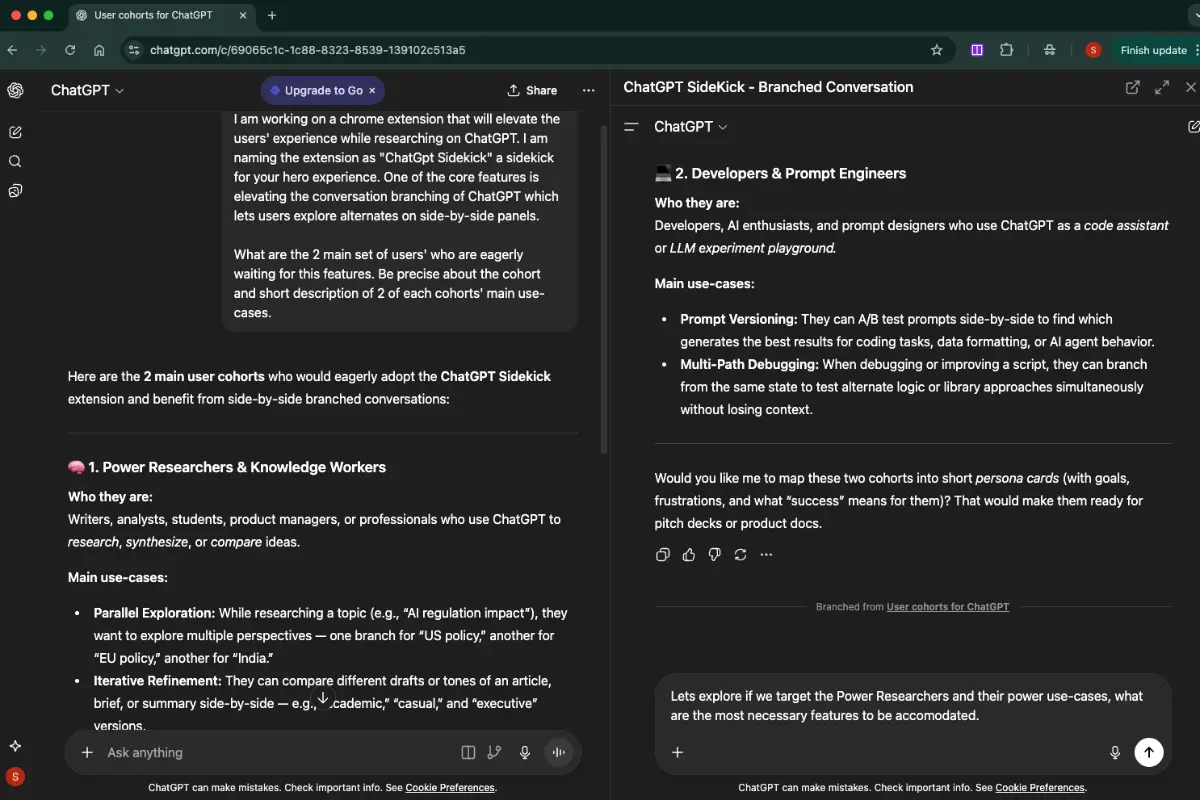
Boost your interaction with ChatGPT with side-by-side panels

@tytlylabs
Details
- Categories
- Automation & Workflow
- Target Audience
- DevelopersContent CreatorsFreelancers
- Platforms
- Web
Discovery signals
How AI and people discover ChatGpt Sidekick on PeerPush
Category standing 30dCategory standingWhere this product ranks by AI reads against every other product listed in its category.
Top 10%
By AI reads among Automation & Workflow tools
206 AI reads in the last 30 days, ranked against every Automation & Workflow tool listed.About ChatGpt Sidekick
A small chrome extension which opens a split screen view within the chatgpt window, so you can explore other topics while not affecting the main context of your chat. As an extra (paid) feature we have put forward the hidden branched conversations, recently launched by ChatGPT. Comparing different approaches makes more sense when they are reviewed side-by-side.
Screenshots
Reviews (0)
No reviews yet. Be the first to rate this product!
Comments (0)
No comments yet. Be the first to share your thoughts!