CrewForm
Building a visual workflow canvas for AI agent orchestration

Details
- Follow on
- @CrewFormHQ
- Target Audience
- Non-Technical UsersFounders & CEOsDevelopers
- Pricing
- Freemium
- Platforms
- Web
Discovery signals
How AI and people discover CrewForm on PeerPush
About CrewForm
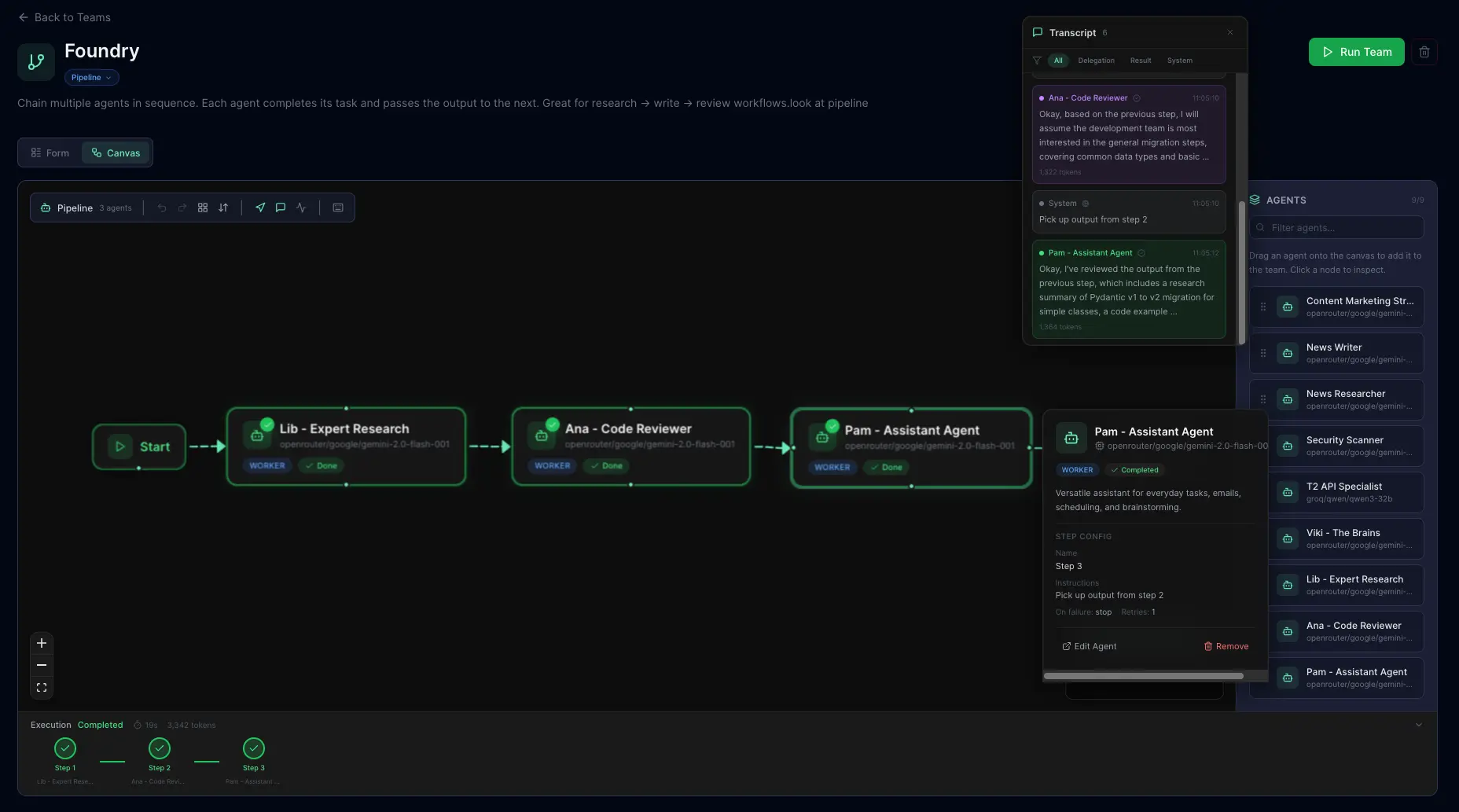
CrewForm is an open-source platform for orchestrating AI agent teams through a web UI. When we first launched, the "What's next" section mentioned an interactive workflow canvas. We shipped it. Here's how it works under the hood. 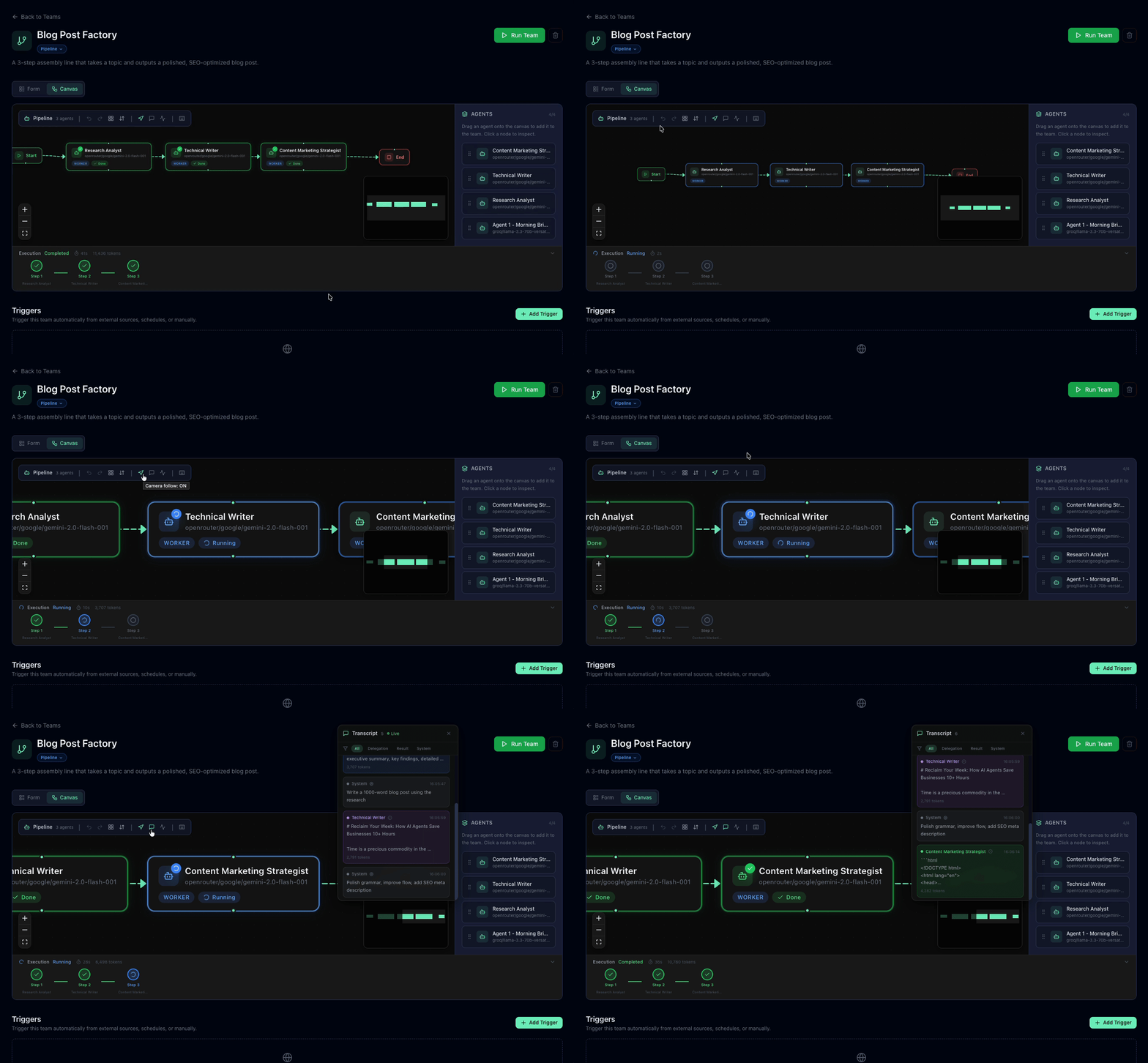 ## The problem In the original version, pipeline teams were configured through a dropdown-based step list. It worked, but it had real limitations: - You couldn't see the full flow at a glance - Rearranging steps meant tedious up/down clicking - Non-technical team members found it confusing - There was zero visual feedback during execution We needed a canvas where agents are nodes, connections are edges, and execution status updates in real-time. ## The stack Three pieces made this work: - **React Flow** — Canvas library. Nodes, edges, panning, zooming, selection, and minimap — all handled out of the box. - **Dagre** — Auto-layout engine. Given a directed graph, it computes x/y positions so nothing overlaps. - **Supabase Realtime** — Live execution state. The task runner pushes status updates, and the canvas highlights the active node instantly. ## Layout system: TB and LR One design decision that took a few iterations: directional layouts. Pipeline workflows naturally flow in one direction. Some people think top-to-bottom (like a flowchart), others think left-to-right (like a timeline). We support both. ```typescript const getLayoutedElements = (nodes, edges, direction = 'TB') => { const dagreGraph = new dagre.graphlib.Graph(); dagreGraph.setGraph({ rankdir: direction, nodesep: 80, ranksep: 100 }); dagreGraph.setDefaultEdgeLabel(() => ({})); nodes.forEach((node) => dagreGraph.setNode(node.id, { width: 220, height: 80 }) ); edges.forEach((edge) => dagreGraph.setEdge(edge.source, edge.target) ); dagre.layout(dagreGraph); // ... map positions back to React Flow nodes }; ``` The tricky part was **edge handles**. React Flow connects edges to specific handles (connection points) on each node — top, bottom, left, right. When you toggle from TB to LR, every edge needs its `sourceHandle` and `targetHandle` swapped: ```typescript function getHandleIds(direction: string) { return direction === 'LR' ? { sourceHandle: 'right', targetHandle: 'left' } : { sourceHandle: 'bottom', targetHandle: 'top' }; } ``` Without this, edges default to the first available handle and you get connections going the wrong direction. Obvious in hindsight — took a few rounds of debugging to catch. ## Inserting agents between steps This was the feature that turned the canvas from a visualisation into a real tool. Right-click any edge → **Insert Agent Here** → pick an agent → done. The new agent splits the edge into two, and dagre re-layouts everything automatically. Under the hood: 1. Remove the original edge (A → C) 2. Insert the new node (B) 3. Create two new edges (A → B, B → C) 4. Re-run dagre layout 5. Animate the transition with `fitView()` Simple in concept, satisfying in practice. ## Real-time execution When a pipeline runs, the canvas comes alive: - The active agent node gets a pulsing highlight - The camera auto-follows the executing node - A side panel streams the live transcript via SSE - Completed steps show a success indicator This is powered by Supabase Realtime subscriptions on the `team_runs` table. When the task runner updates a step's status, the canvas reflects it within milliseconds. ## Persisting layout preferences Small detail that matters: layout direction is saved per-team in the JSONB config column alongside the graph structure. When a user opens a team they set to LR last week, it opens in LR — no reconfiguration needed. One gotcha: we use `useRef` for shared layout state to avoid stale closures in React Flow callbacks. We hit that bug twice before learning the lesson — anything that edges or layout callbacks depend on should live in a ref, not plain state. ## What I'd do differently 1. **Ship the canvas earlier.** The dropdown config was a stepping stone, but users immediately understood the canvas better. Visual-first should have been the approach from day one. 2. **Use refs for callback-dependent state from the start.** React Flow callbacks capture closure values at creation time. If you're using layout callbacks with dagre, reach for `useRef` before `useState`. ## Try it The visual canvas is live and fully open-source: - ⭐ [GitHub](https://github.com/CrewForm/crewform) — star the repo - 🌐 [Live Demo](https://crewform.tech) — try it now - 📖 [Docs](https://docs.crewform.tech) - 💬 [Discord](https://discord.gg/TAFasJCTWs) If you've built anything with React Flow + dagre, I'd love to compare notes. And if you have ideas for the canvas — multi-select, copy-paste node groups, conditional branching — drop a comment or open an issue.
Screenshots
Product Updates (1)
6 releases in 6 weeks — workflow templates, chat widget, MCP publishing & free trial
6 releases shipped — here's what changed. Traction: Inbound interest about reliability and self-hosting. MCP Server Publishing (v1.7.1) — Expose agents as MCP tools so Claude Desktop, Cursor, and other clients can call them directly. Auto-generated config snippets included. Embeddable Chat Widget (v1.8.0) — Drop a script tag on any website for a floating chat widget powered by any CrewForm agent. Domain whitelisting, persistent history, customizable theme. Observability (v1.8.0) — Opt-in OpenTelemetry + Langfuse tracing. Works with Datadog, Jaeger, Grafana Tempo. Zero overhead when disabled. Canvas Upgrades (v1.8.1) — Copy/paste nodes, sticky notes, node I/O inspector for viewing exact input/output during runs, and draft autosave. AG-UI Rich Interactions (v1.8.2) — Agents pause mid-execution to ask for user input: approvals, data confirmation, choices, and multi-step wizards with branching logic. Workflow Templates (v1.9.0) — Package agents, teams, and triggers into reusable templates. One-click install from the marketplace creates all agents, config, and pipeline steps. Creation wizard auto-detects variables in prompts. Ships with 5 built-in starters. 7-Day Free Trial (v1.9.1) — Every signup gets full Team-tier access for 7 days — orchestrator, collaboration, custom tools, channels, A2A, RBAC. No credit card. Also shipped: Turnstile bot protection, creator analytics, hybrid RAG search, agent/team JSON export/import, and cryptographic license validation. Next up: public status page, more templates, community growth. ⭐ github.com/CrewForm/crewform · 🌐 crewform.tech
Comments (1)

Reviews (0)
No reviews yet. Be the first to rate this product!



Comments (1)
A visual workflow canvas for AI agent orchestration is exactly the kind of tooling the ecosystem needs. Drag-and-drop agent coordination makes multi-agent pipelines more accessible and understandable.