
Shortcut Canvas
Convert Shortcuts actions into reusable image blocks


Details
- Target Audience
- Pricing
- One-time
Discovery signals
How AI and people discover Shortcut Canvas on PeerPush
By AI reads among Design Tools tools
17,121 AI reads in the last 30 days, ranked against every Design Tools tool listed.About Shortcut Canvas
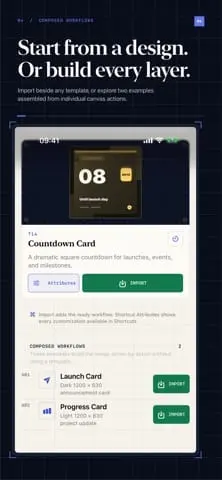
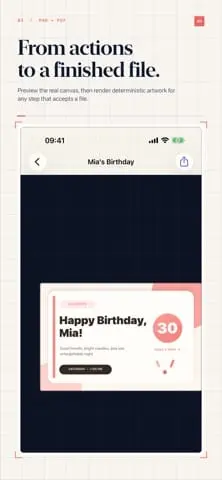
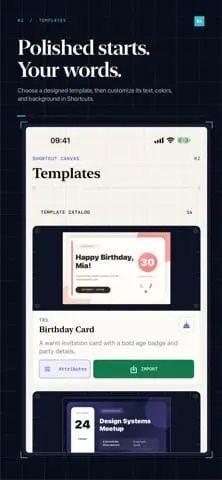
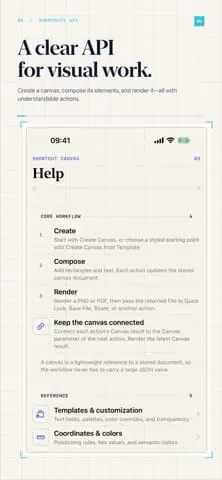
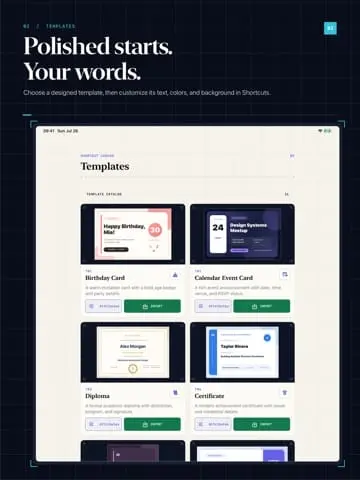
Shortcut Canvas turns actions in the Shortcuts app into reusable image-building blocks. You can create a canvas, add rectangles and styled text, then render the result as a PNG or PDF file. Canvas-building actions return the canvas used by the next action, keeping multi-step workflows readable and composable. The finished files can be passed directly to Quick Look, Save File, Share, or Send Message. It includes 14 built-in templates such as birthday cards, diplomas, and business cards that can be customized via hex values or semantic colors. For custom designs, users can specify canvas dimensions, scale, and appearance, adding elements with controlled opacity, rotation, and shadows. The companion app provides a unified register to inspect rendered thumbnails and export files.
Screenshots
Product Updates (3)
1.2.0
- German, Polish, Hindi, Simplified Chinese, Spanish, French, and Japanese alongside English. The interface, template defaults, Shortcuts action names, parameters and summaries, Siri phrases, accessibility labels, and error messages follow the app language. - Language-aware plural forms for canvas counts, relative dates, and action results. Existing canvas documents and your custom text remain unchanged.
Comments (0)
No comments yet. Be the first to share your thoughts!
1.1.0
Added - Add Image from File accepts photos and image files directly from other Shortcuts actions, with fit, crop, corner radius, tint, and opacity. Images are copied into the app automatically and remain available for later rendering and canvas sharing. - Add Symbol places SF Symbols with size, weight, scale, monochrome, hierarchical, palette, or multicolor rendering, up to three palette colors, background, padding, opacity, rotation, and positioning anchors. - Two-color gradients with four directions in Add Rectangle and Add Ellipse. Leave Gradient End Color blank to retain a solid fill. - Nine positioning anchors in Rectangle, Ellipse, Text, and Symbol actions, including center and bottom-right placement. - Text fitting with a maximum height and minimum scale factor, line and letter spacing, and vertical alignment in Add Text. - Two editable examples in Templates: Photo Card asks for a photo and caption; Progress Report asks for a project title and percentage and draws a progress bar. Both demonstrate the new styling and symbol actions. Fixed - Text fitting shrinks individual characters that exceed the text box width.
Comments (0)
No comments yet. Be the first to share your thoughts!
1.0.2
Added - Size presets in Create Canvas: social story, square post, portrait post, landscape, YouTube thumbnail, or custom dimensions. - Document management actions: Clear Canvas removes every node from a canvas, Remove Last Node undoes the most recent addition, and Duplicate Canvas copies a document with its complete artwork. - New node actions: Add Ellipse draws circles and ellipses with fill, border, and shadow; Add Line places straight dividers; Add Progress Bar draws a bar for a 0–100 value; Add QR Code places a scannable code encoding a text or URL value with foreground and background colors; and Update Text replaces the content of a text node, with optional new color or font size. - Add Image places an image imported into the companion app — the Canvases tab import menu's Import Image entry and its imported-images list — with fit, corner radius, tint, and opacity. Swipe left on an imported image to remove its copy from the app. - Batch Render Canvases renders every saved canvas and bundles the PNG or PDF exports into a single ZIP archive. - Four new social-format templates with matching size presets — Story Post, Portrait Post, Landscape Banner, and Video Thumbnail — bringing the catalog to 18 templates and 21 bundled, editable Shortcut files. - Share any canvas from its detail screen as a portable `.canvas.json` document and re-import it from the Canvases tab import menu to move artwork between devices or installs without re-running the shortcut. - Name search in the Canvases tab filters the register as you type and matches untitled canvases by their fallback name. - A light/dark preview switch in canvas detail to check both appearances without changing the device. ### Fixed - Import Image reliably opens the photo picker from the Canvases menu. - Restore editable text and palette controls for all 18 templates in Shortcuts.
Comments (0)
No comments yet. Be the first to share your thoughts!
Reviews (0)
No reviews yet. Be the first to rate this product!
Comments (0)
No comments yet. Be the first to share your thoughts!