
4K Video Upscaler
AI video upscaler that runs on your GPU — nothing uploaded

Details
- Categories
- Use Cases
- Target Audience
- Pricing
- Free
- Platforms
Discovery signals
How AI and people discover 4K Video Upscaler on PeerPush
About 4K Video Upscaler
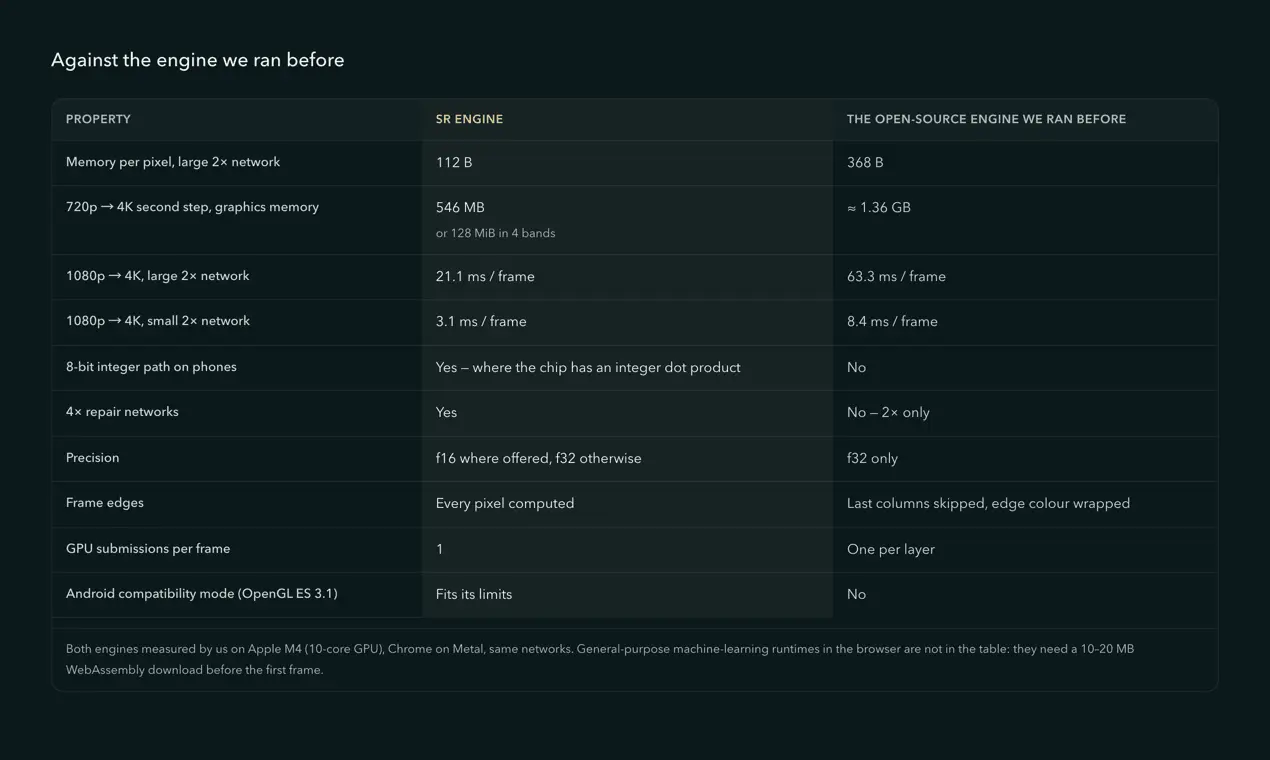
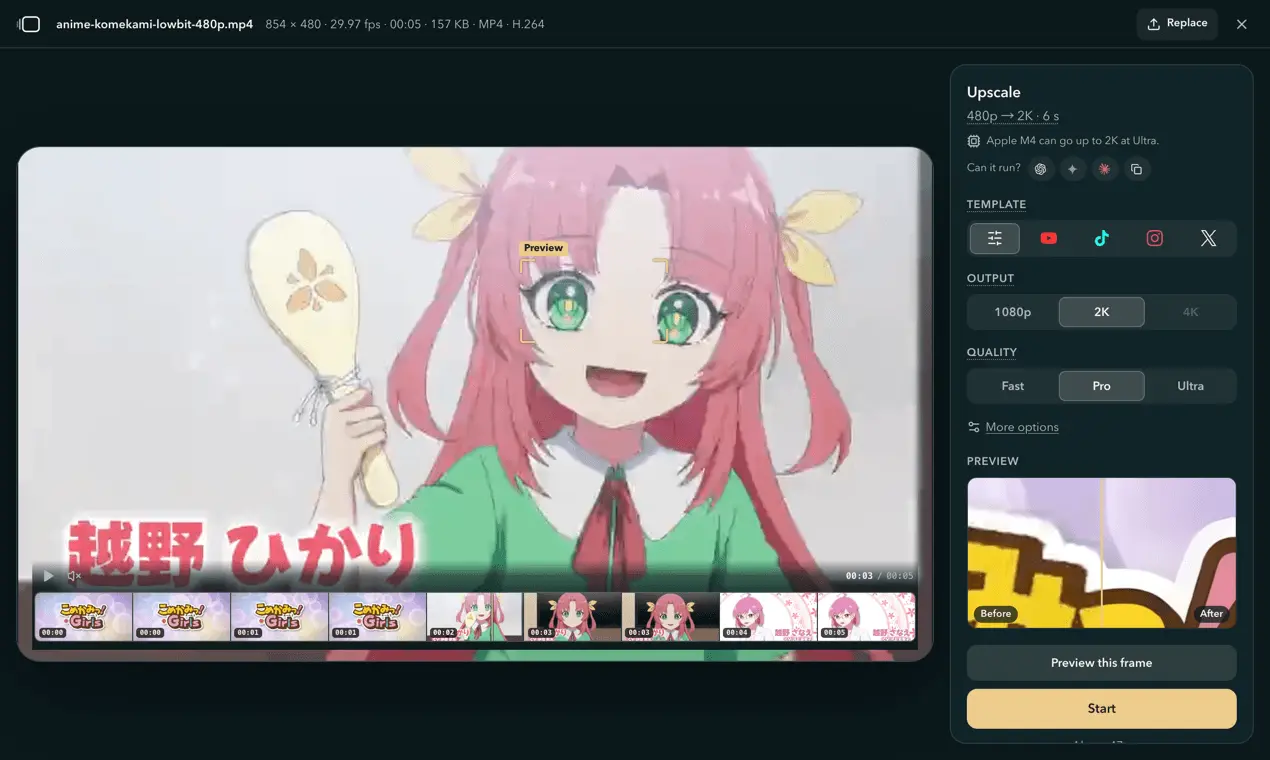
4K Video Upscaler makes a low-quality video bigger and cleaner, and it does the work on your own machine. Choose a file and the browser reads it locally, tells you what your GPU can run, and gives a time estimate before anything starts. Nothing is uploaded: there is no server that could receive your footage, and the only requests the page makes are for its own files and the model weights. It runs on an in-house WebGPU inference engine — no general-purpose machine-learning runtime, no multi-megabyte download before the first frame; a whole model is under 3 MB. Measured on the same machine against the open-source engine it replaced, it is about 3× faster and uses a third of the memory per pixel, submits one command buffer per frame instead of one per layer, and computes every output pixel — the engine it replaced skipped the last columns of each frame. The full measured table, with conditions, is on the site. Correctness is tested, not asserted: a plain TypeScript implementation defines what each network should output, PyTorch outputs of every shipped model are the fixtures, and the GPU suite runs them on Chrome, Chrome's software renderer and the Safari engine. On phones an 8-bit integer path nearly halves the time of the heaviest tier — which is what puts it on a phone at all — and it is checked on the kind of device it ships on. Three tiers. Fast firms up edges on clean footage and is quick enough for phones. Pro is a compact restoration network that removes compression blocks and light noise — the right choice for most repairs. Ultra goes deeper for old film and heavy grain, with a three-step denoise control. Upscaling goes up to 4×, so 720p and 1080p reach 4K and 480p reaches 2K. No length limit and no paywall. A file up to 2 GB, whole or a window dragged on the filmstrip; long runs checkpoint as they go, so you can close the tab and continue later. When it finishes you compare before and after on the same frame with a detail window you can place anywhere, then download it as MP4, MOV, MKV or WebM with the original audio. The file size (the video bitrate) is a setting — Smaller, Standard or Larger, about 17.1 / 34.2 / 54.7 Mbit/s for 4K H.264, or a rate you type (1–100 Mbit/s) — and a finished result can be exported again in another size, format, container or frame rate without a second upscale. Stated plainly, because most tools in this category will not: no deblurring, no shake removal, no de-interlacing, no frame interpolation, and it never invents detail the frame never had. A blurry clip comes out bigger with firmer edges. Preview a single frame before committing to a run and you will see exactly that. Needs a browser with WebGPU — current Chrome, Edge or Safari, Firefox on Windows or Mac, or Chrome on Android 12+.
Screenshots


Reviews (0)
No reviews yet. Be the first to rate this product!
Comments (1)
Maker here. It runs on your own GPU through WebGPU, so nothing is uploaded. The inference engine is ours; the measured numbers are on the site. Ask me anything about the tiers.