
Adelvo Commander
Dual-pane SFTP+Terminal, local files, AI rename and backup

Details
- Follow on
- Categories
- Target Audience
- Pricing
- Paid from $3
- Platforms
- Featured in
Discovery signals
How AI and people discover Adelvo Commander on PeerPush
About Adelvo Commander
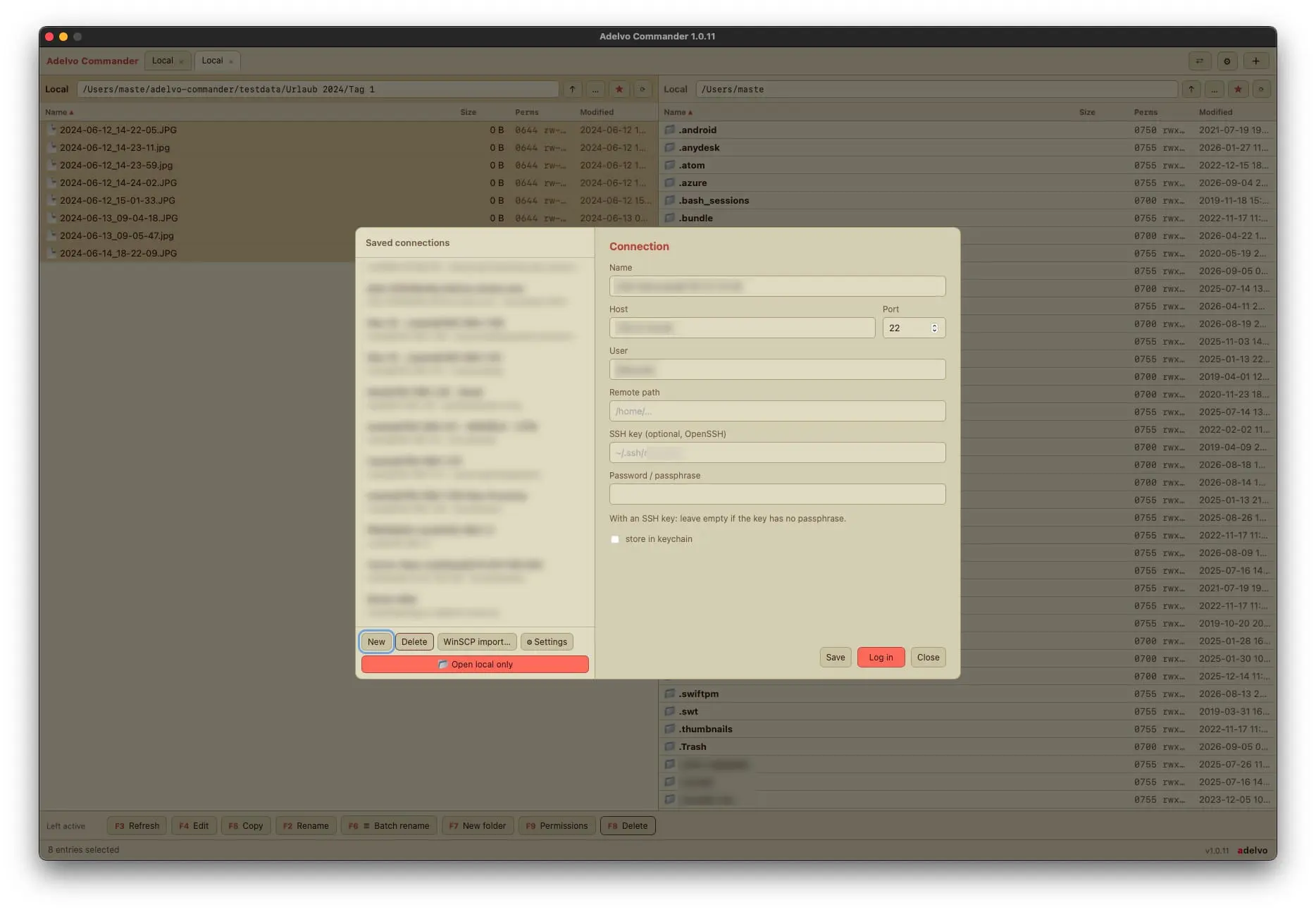
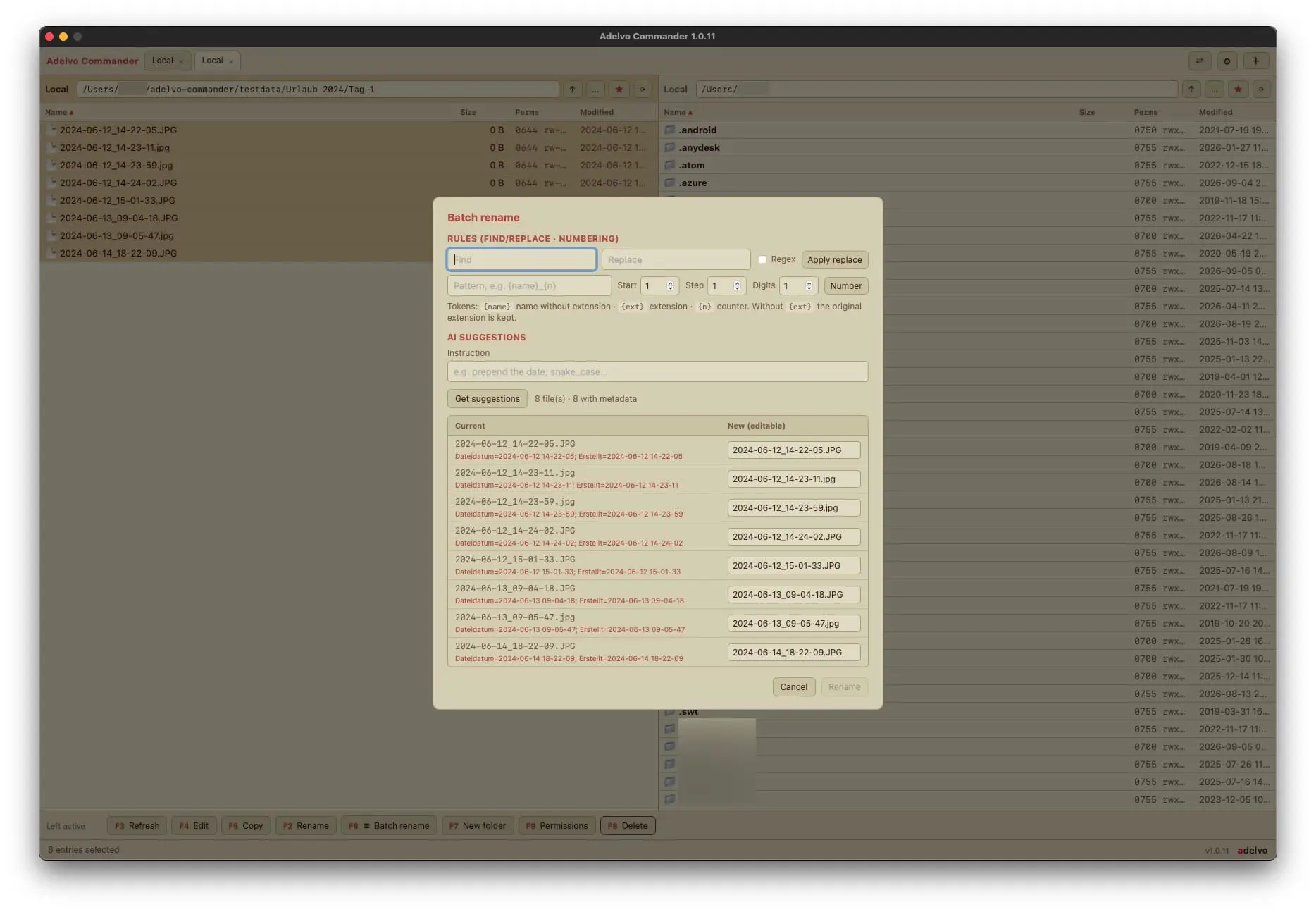
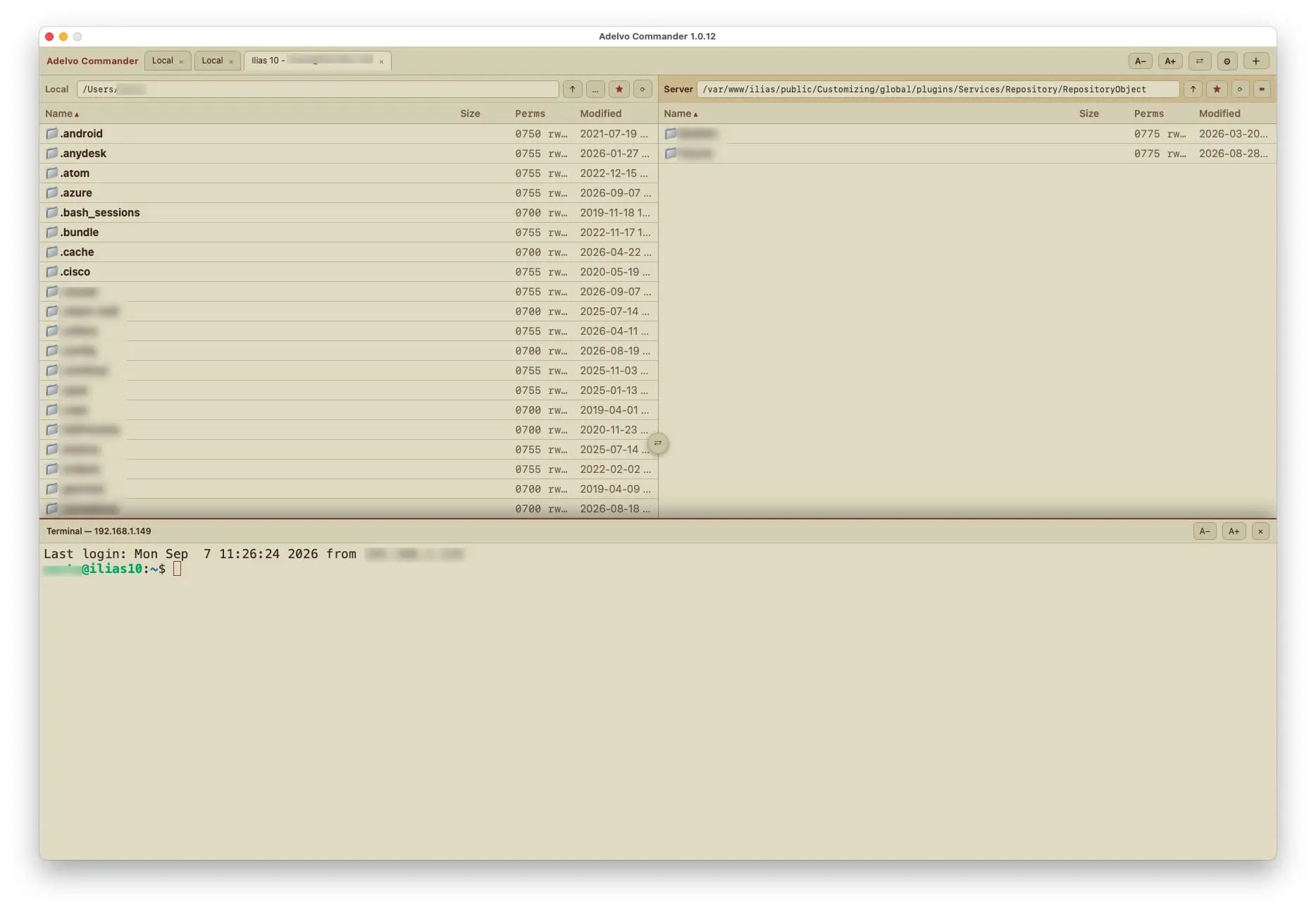
About Adelvo Commander A native dual-pane file manager for macOS and Windows: online and local in one clean window. Replaces the WinSCP / Total Commander workflow: SFTP and local files side by side, across tabs. SFTP: saved sessions with passwords in your keychain, edit in place with automatic re-upload, chmod and host-key verification (known_hosts). A terminal in every pane: an SSH shell on the connected server, or a local shell in the current folder. Fast copy engine with live throughput, ETA, stop and resume. Batch rename by plain-language AI instruction or by find/replace and numbering rules, reading EXIF and ID3. Always with a before/after preview. FreeFileSync-style backup and sync: named jobs, local or over SFTP, update or mirror. Mandatory compare preview before anything is written. Deletes go to a recoverable trash, even on network drives. Move detection and bundle awareness: a moved or renamed file is moved at the target, not copied again. Imports FreeFileSync (.ffs_gui) and Carbon Copy Cloner (.ccctask) jobs. AI-suggested filters. Folder compare side by side, file diff with one-click block copy and a 3-way merge. Markdown viewer and editor with live preview. Thumbnails for photos, PDFs and videos, per folder, locally and over SFTP. Drag and drop, bookmarks, Terminal-style colour themes. 20 languages. macOS (Apple Silicon) and Windows (x64 and ARM64). Signed and notarized. 14-day free trial with every feature. Then a one-time purchase, pay what feels fair (from $3). Same full app at every price, no subscription. SFTP Client, File Manager, Dual Pane, WinSCP Alternative, Total Commander Alternative, SSH Terminal, Batch Rename, AI Rename, EXIF, ID3, Backup, Folder Sync, FreeFileSync Alternative, Folder Compare, File Diff, Markdown, Thumbnails, chmod, macOS, Windows
Screenshots
Product Updates (4)
Adelvo Commander 1.0.39 is out.
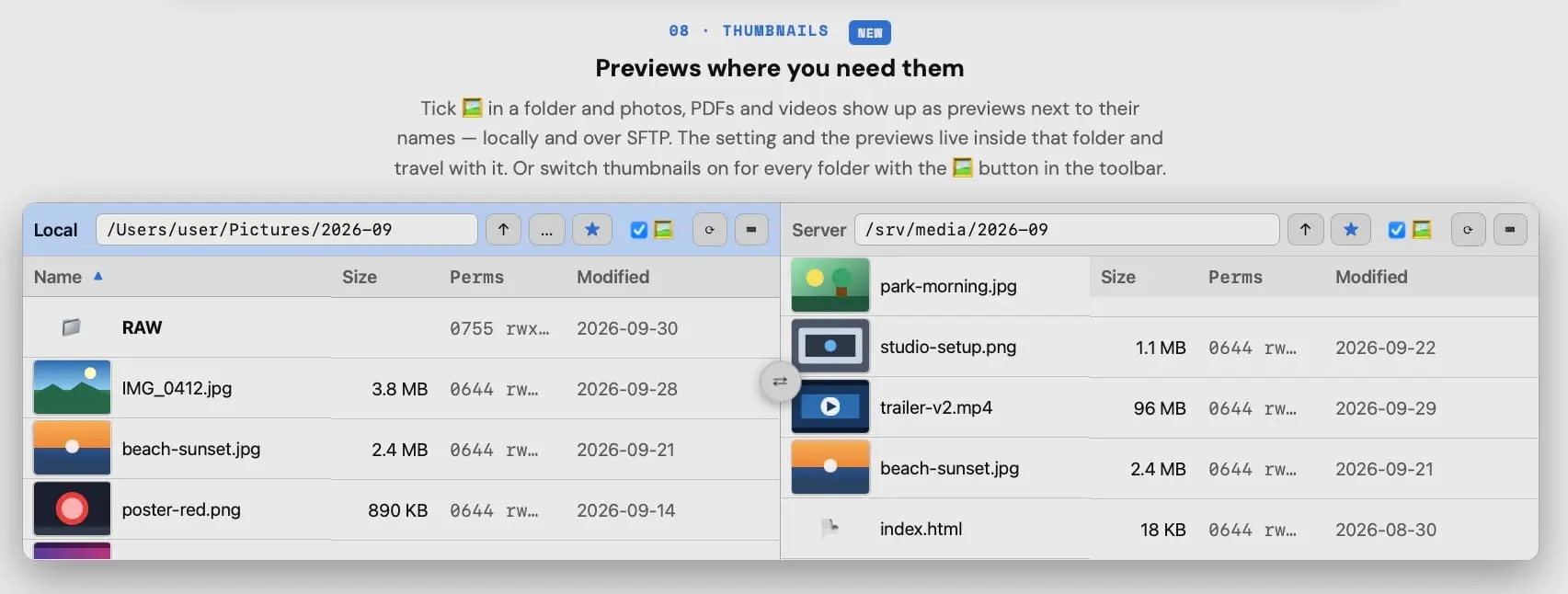
Thumbnails: tick the picture box in a folder and it shows previews of photos, PDFs and videos next to the file names, locally and on SFTP servers. The previews are stored inside that folder, so they travel with it and are never rebuilt. Or switch thumbnails on globally for every folder. On macOS the previews come from QuickLook, the same images the Finder shows. MKV, AVI and WebM get a still frame through ffmpeg if it is installed. Folder compare now shows its progress and can be stopped at any time, even when you started it on a whole drive. A new toolbar button hides hidden files in all panes at once. The toolbar icons are larger. Fixed: on Windows and Linux a double-click on a file did nothing. It now opens the file in its default app. Free update for all users. adelvo.io/adelvo-commander/
Comments (0)
No comments yet. Be the first to share your thoughts!
v1.0.38 ADELVO COMMANDER September 2026
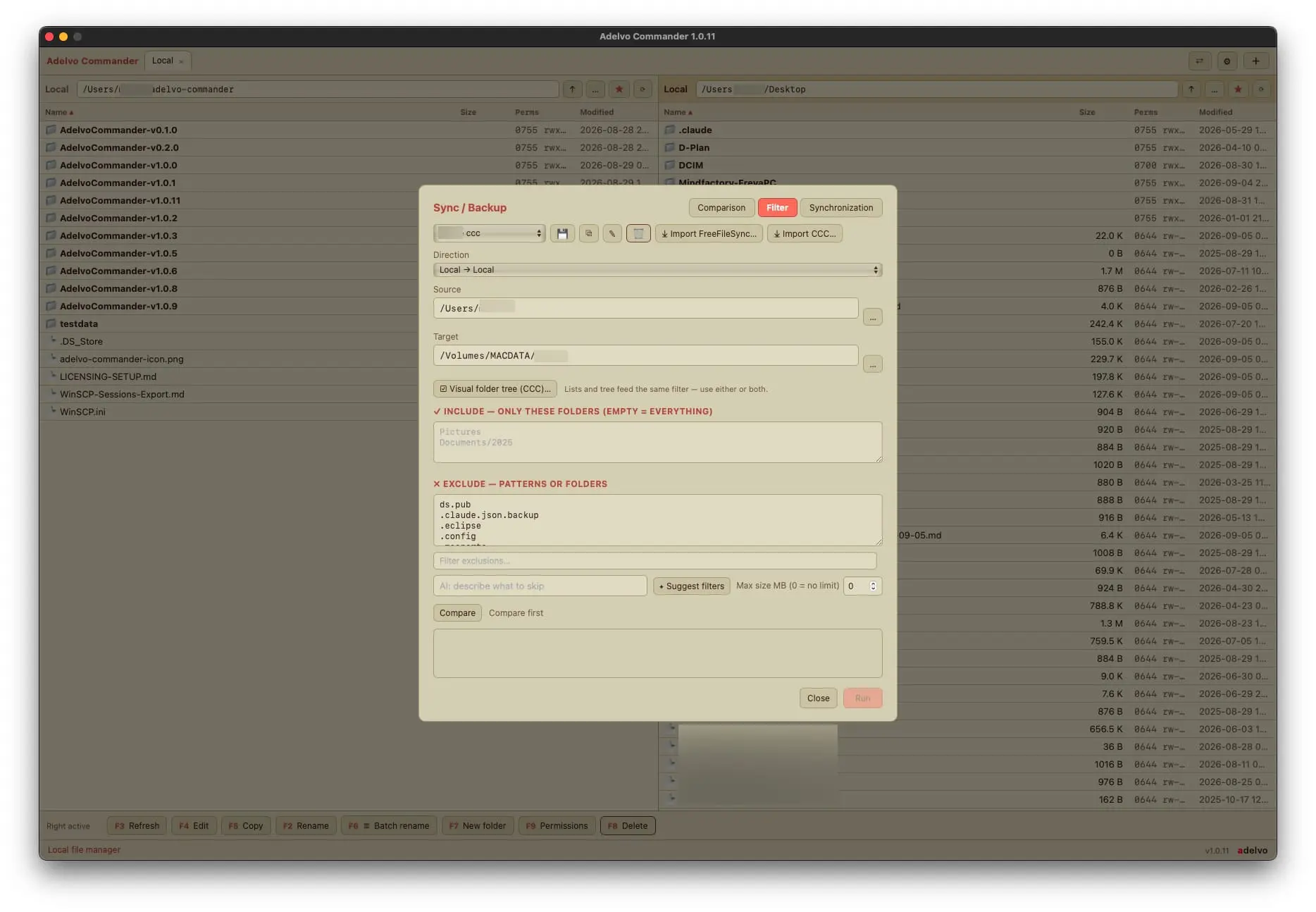
v1.0.38 ADELVO COMMANDER September 2026 Backup and sync: faster comparison over SFTP, exclude patterns that understand paths, and reliable matching of accented file names. ✦ Faster comparison over SFTP Several folders are scanned at once. Comparing a large tree against a server is four to five times faster than before — the same hardware, just less waiting on the network. ✦ Exclude patterns with paths Three forms, one rule: node_modules matches that name at any depth; build/Logs matches wherever a path ends like this; a leading slash such as /Music anchors the pattern to the top of the source folder. Existing plans keep working exactly as before. Patterns with a slash from earlier versions are anchored automatically the first time the plan is loaded. Imports fixed: anchored exclusions from FreeFileSync profiles and folder rules from Carbon Copy Cloner tasks now take effect. A hint below the Exclude field shows the syntax; the manual has the details. ✦ Accents and umlauts in file names The same name is the same file. macOS stores Büro differently from Windows and Linux; Commander now compares them as equal, so a file is no longer reported as new and deleted at the same time. New files land in the folder that already exists on the target. Filters and include lists match such names as typed. ◆ Also in this release App icon redrawn for macOS 26 and 27 — no grey plate behind it in the Dock; unchanged look on older systems. The include list accepts entries like /Folder/ from imported profiles. ⬇ Get Adelvo Commander (macOS · Windows)
Comments (0)
No comments yet. Be the first to share your thoughts!
Adelvo Commander 1.0.36-7 - read and write Markdown
Adelvo Commander can read and write Markdown now. Double-click a .md file and it opens in its own tab: the text on the left, a live preview on the right, both scrolling together. Edit and save with Cmd+S or Ctrl+S — saving asks first, and a file that changed on disk in the meantime is never overwritten. The part I use most: select in the preview and copy. Click into it and press Cmd+A, or right-click and choose Copy all. Headings, bold, lists, tables, links and emoji all survive the paste into Word, Mail or Pages — but the colours don't, so the text arrives in the colours of the document you paste into. Light or dark, it fits. Commander also opens .md files straight from Finder or Explorer. It asks once whether it should be your default Markdown app, and changes nothing without your yes. That replaced a separate Markdown app here. Counting it up: Commander has taken over from WinSCP, FreeFileSync, Carbon Copy Cloner, Beyond Compare, MacDown and iTerm on my own machines — iTerm went because every pane now has its own terminal on that pane's connection, so there is nothing left to log into separately. Six apps gone, one window left. macOS and Windows, signed and notarized, 20 languages. Existing users get it through the built-in updater. https://adelvo.io/adelvo-commander/
Comments (0)
No comments yet. Be the first to share your thoughts!
Adelvo Commander 1.0.35 — compare folders and files
Commander now does the comparing I used to open a separate tool for. Folder compare - Compare the two panes: folders expand in place, both sides stay aligned row by row, and a hatched row marks where a file is missing on one side. No third folder, no extra window. - Filters for differences, everything, left only and right only; ↑ marks the newer file. - Change the folder on either side and it compares again straight away. - Local folders for now. File compare - Double-click a differing file to open both versions side by side in their own tab, with line numbers. - Show everything, only the differences, or the differences with three lines of context; jump from block to block. - Hover a difference and click the arrow in the margin to copy that block to the other side — or use the toolbar or right-click menu. Undo included. - Saving always asks first. Line endings, the final newline and permissions are kept, and a file that was changed on disk in the meantime is not overwritten. 3-way merge - Carry your own changes into a new version of a file (Base / Mine / Theirs). Only real conflicts are left for you; optionally Claude suggests a resolution, and only the conflicting sections are sent. Fixed - Dropping a folder onto the address bar on a Retina display opens it instead of copying it. - Larger close buttons on tabs. macOS (Apple Silicon + Intel) and Windows, 20 languages. Existing users get it via the built-in updater; downloads at https://adelvo.io/adelvo-commander/
Comments (0)
No comments yet. Be the first to share your thoughts!
Reviews (0)
No reviews yet. Be the first to rate this product!
Comments (0)
No comments yet. Be the first to share your thoughts!