
BudgetGo
Privacy-focused offline monthly budget planner


Details
- Follow on
- Categories
- Pricing
- One-time from $2.28
- Featured in
- Alternatives

Discovery signals
How AI and people discover BudgetGo on PeerPush
By AI reads among Personal Finance tools
59,882 AI reads in the last 30 days, ranked against every Personal Finance tool listed.About BudgetGo
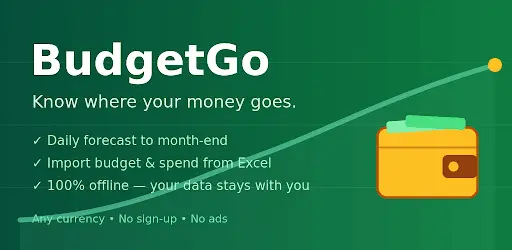
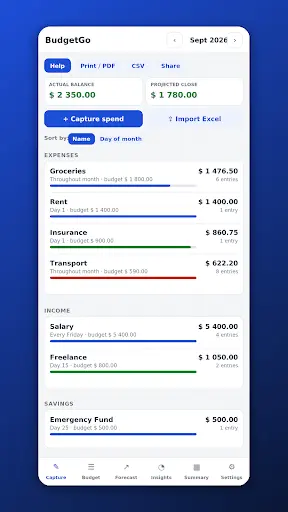
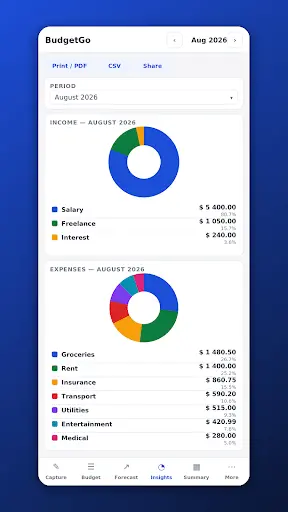
BudgetGo is a monthly budget planner designed to help you manage cash flow while maintaining complete privacy through offline operation. The tool allows you to set up customizable income and expense schedules with daily, weekly, or monthly patterns. You can log purchases quickly to see instant progress bar updates, import transaction batches via Excel or CSV with duplicate detection, and view real-time forecasts to predict your end-of-month balance based on current spending habits.
Product Video
Watch a video demo of BudgetGo.
Screenshots
Reviews (8)
Average 4.5 out of 5
Based on 8 reviews


I just feel the logo and ui needs a little uplift

This is really awesome! Exactly what I was looking for in a budget app. I was looking for an alternative to those complicated and overly featured budget apps that I could never stay consistent with. Simple is better


Nice and easy to use good work

A budget view that separates fixed costs from the rest is easier to trust. I would want a warning before a category goes over its limit.
Comments (13)
Does the forecast handle irregular bills, like annual insurance or a yearly subscription, or only the daily, weekly and monthly patterns?
@galdayan1895 BudgetGo isn’t a 12-month rolling forecast. It plans one month at a time and forecasts your balance to month-end from actual spend. For annual costs, just add them to the budget in the month they’re due.
Offline-first budgeting is a strong trust choice. The forecast depends on recurring expenses being modeled well—does BudgetGo warn when imported transactions diverge from a planned schedule, or is reconciliation entirely manual?
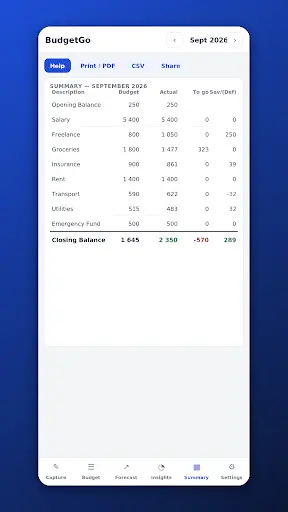
@contact8583 Thanks! Yes. Overspent lines are colour coded and the Summary’s To go column shows how far over you are. Scheduled items not paid by their day show as overdue on the Forecast, and you’re alerted if month-end goes below zero.
When an import flags a duplicate, can I review the match before it is skipped? Two separate purchases with the same amount and date are an easy edge case.
@GeneralManager_Getatext Yes! Nothing saves until you tap Import. Possible duplicates show a red “duplicate?” tag and default to Skip. If it’s a real separate purchase, change its dropdown to the right budget line before importing.
@kate159 Thanks, that answers my concern. Reviewing the duplicate flag before Import keeps separate purchases from being silently dropped.
Going offline-first is a smart privacy angle, since many people hesitate to hand bank data to an app. Does it let you set recurring monthly items, so the plan carries over without re-entering everything each month?
@tomerbarm It does. The budget carries over from the prior month and you can change the budget as and when you need to. Thank you for the feedback!
Great concept! Solid execution with an intuitive interface & digestible information. I would recommend some refinement to alignment, spacing & margins to create a more breathable & gridded look & improve reading rhythm. Nice job though!
A privacy-focused budget planner that works fully offline is a good fit for people wary of linking bank accounts. Good luck with the launch!
A budget view that separates fixed costs from the rest is easier to trust. I would want a warning before a category goes over its limit.
Ever wondered where your money went by the 23rd? 🙈 BudgetGo shows you what you can spend each day so you make it to payday. Free for 30 days, then one once-off purchase. No subscription, no ads.