
Directors Plan for vMix
A visual rundown timeline for vMix with real automation.

Details
- Follow on
- Categories
- Use Cases
- Target Audience
- Pricing
- One-time from $49
- Platforms
- Featured in
Discovery signals
How AI and people discover Directors Plan for vMix on PeerPush
About Directors Plan for vMix
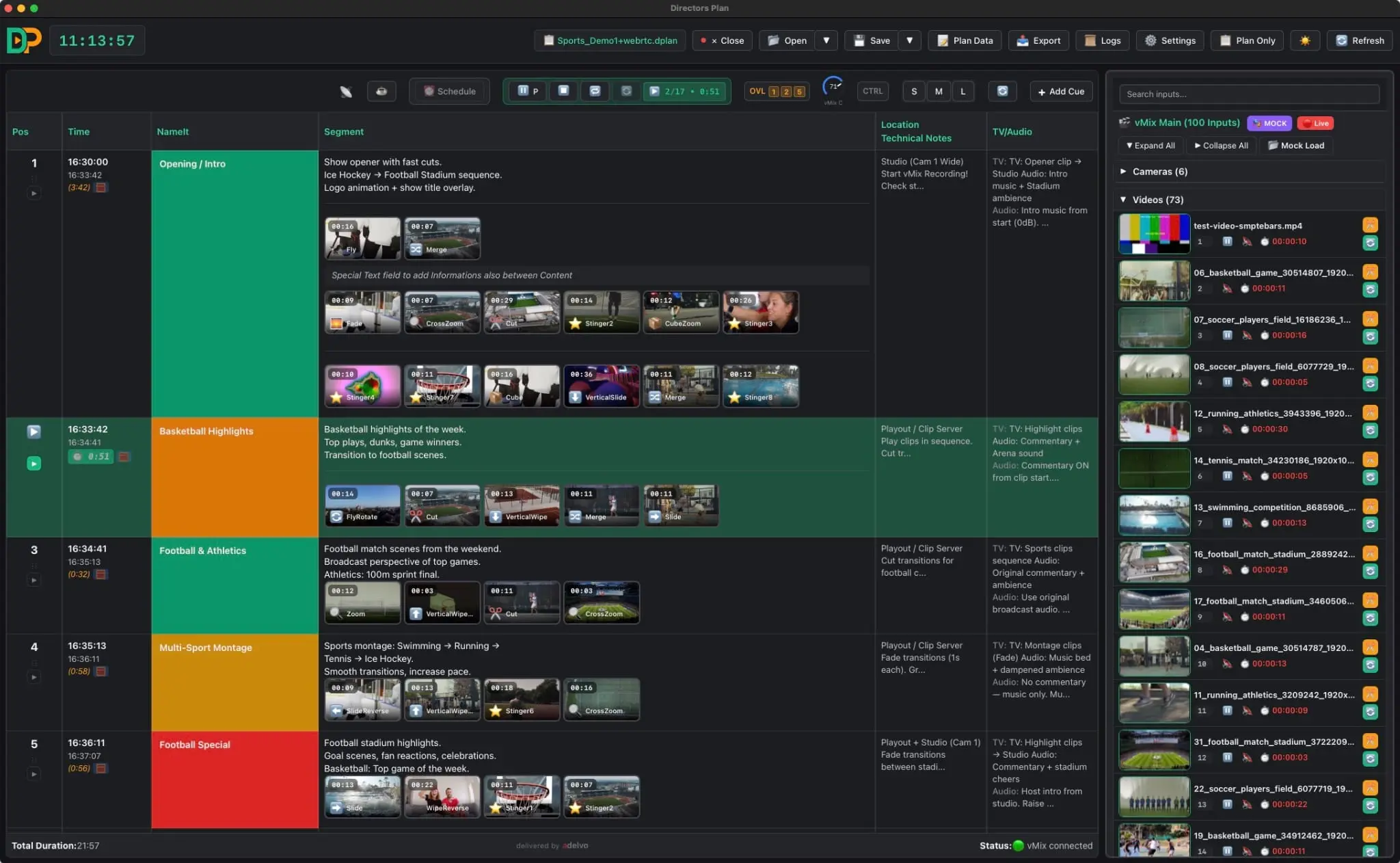
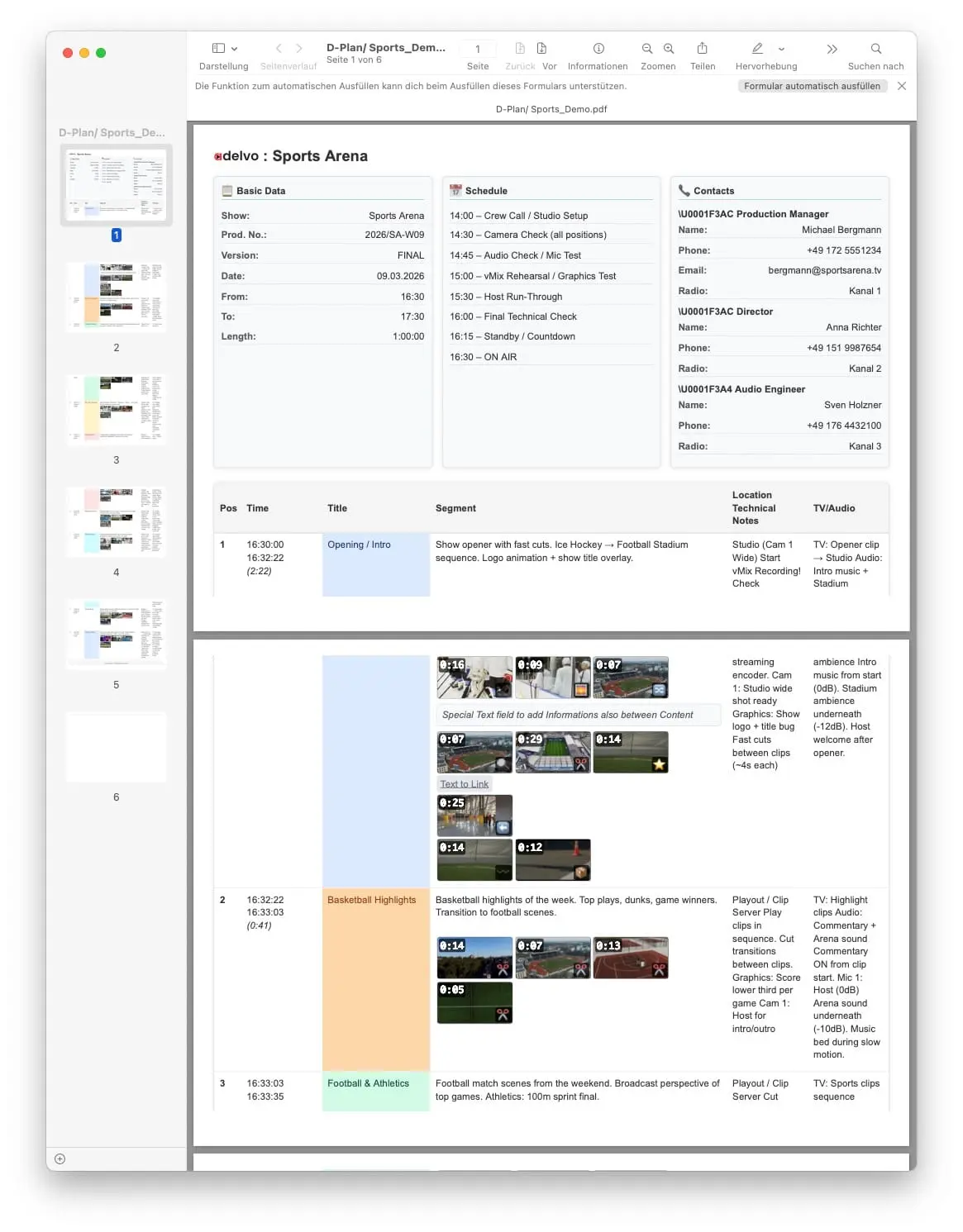
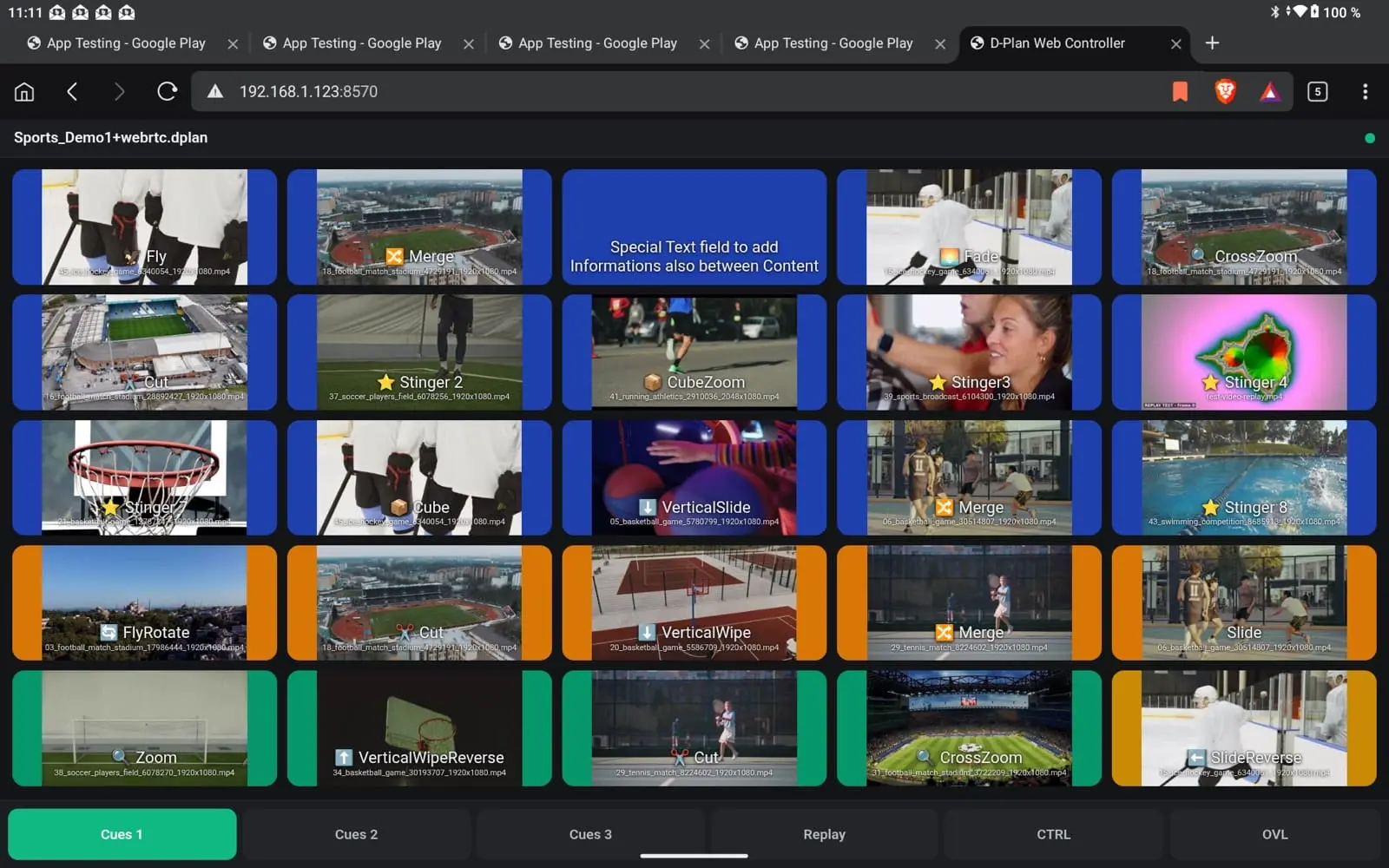
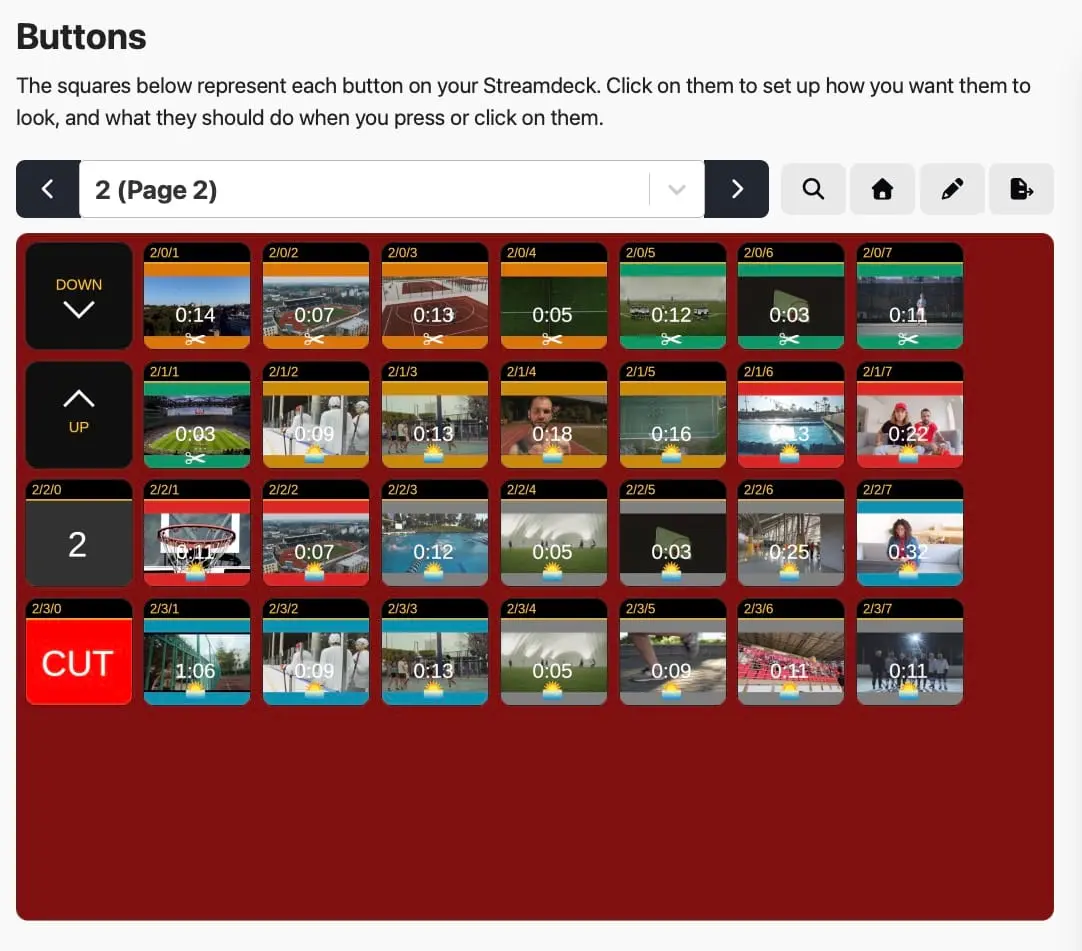
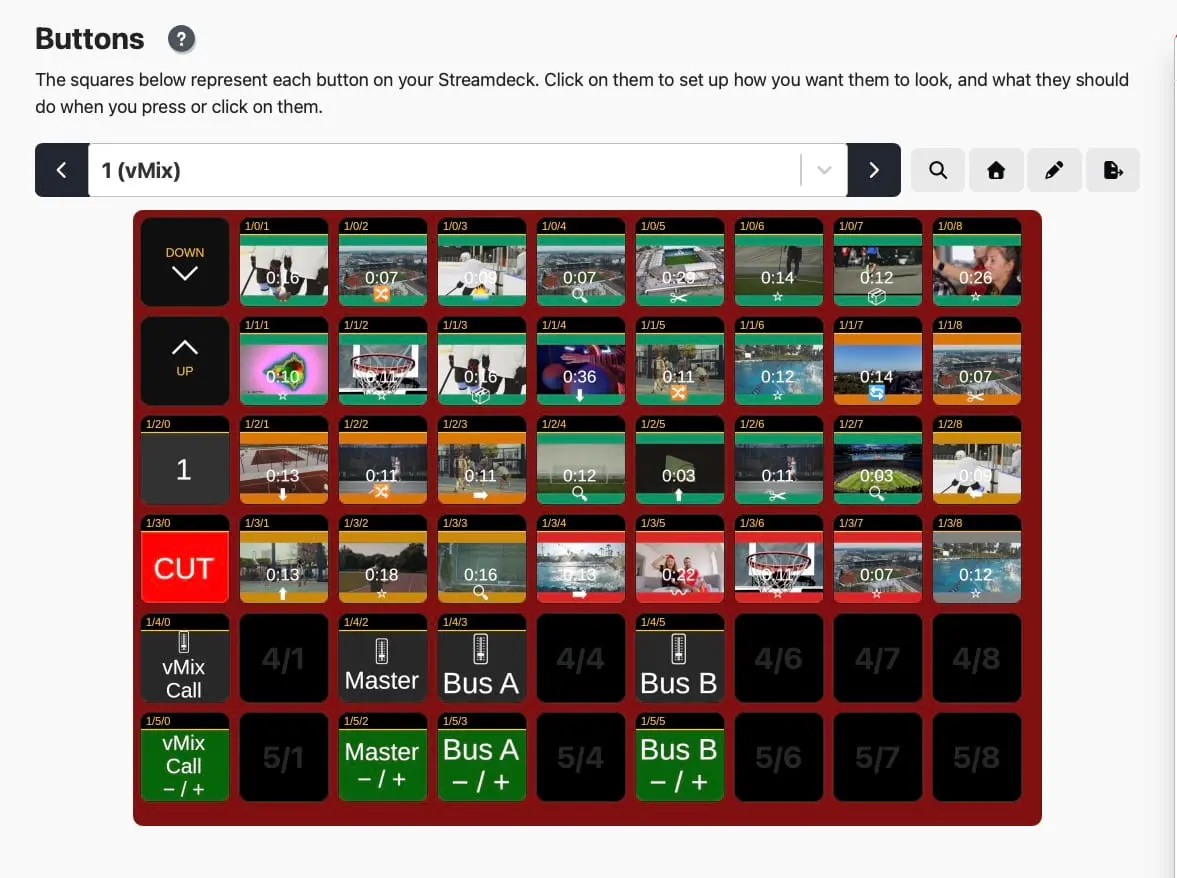
About Directors Plan for vMix A visual rundown timeline for vMix with real automation. Plan the show on Monday, hit Play on Sunday. Build the show once: cues, durations, overlays, audio and vMix commands on one timeline, saved in one file. Play Mode runs the show automatically. Every cue can be overridden live, at any time. Built for teams: one person plans, someone else presses Play. Several operators can work on one vMix without a second machine. Web Controller: any tablet or phone on your network becomes a live touch surface. No app, just a browser. Five pages: Cues, Replay, CTRL, OVL, CAT. CTRL page: group faders, sound on/off with fade, master and bus level meters with peak hold, REC/STREAM and the output matrix. Live tally in red and green on the timeline, in the vMix input list, on Stream Deck and in the Web Controller. Companion / Stream Deck export with live status colours and thumbnails. Preview thumbnails for every vMix input through the free DP Thumbnail Server, including Video List items with their own thumbnail and duration. One-click multi-camera replay from the timeline, the keyboard or a tablet. Overlay Control Mode: up to 8 overlay channels, exclusive or additive, per cue or persistent. Audio volume fades and audio bus routing per cue. vMix Command Builder and text-to-link commands: every vMix function can be used in the rundown. Any cue can fire an HTTP request (GET, POST, PUT, PATCH, DELETE, HEAD) to drive lighting, webhooks or other gear. DP-Append: build shows modularly from saved segments. Mock Mode: plan anywhere without vMix and share the plan. Exports: HTML/PDF production handout, Companion / Stream Deck, CSV. Full keyboard control, even during automation. Session logging. macOS (Universal), Windows (x64 and ARM64) and Linux (.deb). 20+ languages. $49 one-time, all taxes included, all v1.x updates included. No subscription, no tiers, no upsells. 30-day free trial with every feature. vMix, Rundown, Timeline, Show Automation, Playout, Live Production, Broadcast, Stream Deck, Bitfocus Companion, Web Controller, Tally, Replay, Overlays, Thumbnails, Audio Mixer, Multi Operator, HTTP Trigger, CSV Export, PDF Handout, Live Streaming
Screenshots
Product Updates (4)
v1.42.215 DIRECTORS PLAN October 2026
v1.42.215 — Handout polish · cleaner HTML/PDF handouts, colours in older plans restored and more small improvements. ⬇ macOS · v1.42.215 ⬇ Windows Intel/AMD64 · v1.42.215 ⬇ Windows ARM64 · v1.42.215 ⬇ Linux · Debian / Ubuntu (.deb) · v1.42.215 v1.42.214 DIRECTORS PLAN October 2026 v1.42.214 — Polish release · smoother timeline, cleaner settings, better translations and many small improvements. ⬇ macOS · v1.42.214 ⬇ Windows Intel/AMD64 · v1.42.214 ⬇ Windows ARM64 · v1.42.214 ⬇ Linux · Debian / Ubuntu (.deb) · v1.42.214
Comments (0)
No comments yet. Be the first to share your thoughts!
v1.42.212 DIRECTORS PLAN October 2026
v1.42.212 — Tally in the app, Video List items, peak hold 🔴🟢 · the program/preview colours from 211 now also show inside Directors Plan, Video Lists finally show what is in them, and every level meter holds its peaks. ★ Live tally in the app Timeline tiles and command buttons get a red frame when their input is on program and a green one on preview; the vMix input list does the same. The colours come straight from vMix (TCP push), not from the plan — a second Directors Plan with a different plan open sees what is live as well. ★ Video List items Every item of a Video List shows its own thumbnail and duration (duration in front of the name). Both are read from the clip files by the thumbnail server — vMix is never asked to select or preview anything, so it is safe during a show. Suggested in the vMix forum. Dragging an item into a cue takes its duration along. The new ⏱ on a list tile sets the cue to this item only or from here to the end of the list; the right-click measurement now also works while the timeline runs. The playing item follows vMix the moment the list moves on to the next clip — no faster polling needed. Needs the built-in thumbnail server or DP Thumbnail Server 1.1.0, plus ffmpeg with ffprobe on the vMix machine. ★ Level meters CTRL in the app shows stereo meters under every group, Master and bus fader, read only while the tab is open. All meters in the Web Controller and in CTRL now hold their peaks for 1.5 s, red from 95 %. ⬇ macOS · v1.42.212 ⬇ Windows Intel/AMD64 · v1.42.212 ⬇ Windows ARM64 · v1.42.212 ⬇ Linux · Debian / Ubuntu (.deb) · v1.42.212
Comments (0)
No comments yet. Be the first to share your thoughts!
v1.42.211 DIRECTORS PLAN October 2026
v1.42.211 — Live tally on Stream Deck and tablet 🔴🟢 · buttons now tell you what vMix is doing: program, preview, overlay on, mute, live levels. On Stream Deck via the Companion vMix module, which the export sets up for you; on the Web Controller built in. ★ Companion export with feedback Cue buttons light up red when their input is on program, green on preview — like the Activators of the official Stream Deck plugin, but generated for the whole show in one click. CTRL with meters. Mute buttons and encoder knobs turn red when muted; the −/+ buttons and the encoder labels draw the bus or group level live. Buses follow your vMix (Master + buses in use, or all A–G); on Stream Deck + the encoders are always assigned. OVL page lists every assigned overlay channel with the input's thumbnail and shows when the overlay is on. Channels 1–8 — vMix 29's API has no functions beyond 8 yet. The export sets up the Companion vMix connection itself (TCP 8099, variables off to keep large setups fast) and remembers your last layout and options. ★ Web Controller tally Cue and overlay buttons turn red / green with a black corner and a PGM / PVW / ON badge — readable on any button colour, thumbnail stays visible. If the same input is assigned to two overlay channels, the other button shows where it currently runs. Overlay buttons now carry thumbnails; missing ones are fetched from vMix on sync. ⬇ macOS · v1.42.211 ⬇ Windows Intel/AMD64 · v1.42.211 ⬇ Windows ARM64 · v1.42.211 ⬇ Linux · Debian / Ubuntu (.deb) · v1.42.211
Comments (0)
No comments yet. Be the first to share your thoughts!
v1.42.210 DIRECTORS PLAN October 2026
v1.42.210 — The Web Controller becomes a mixer 🎚️ · the CTRL page now shows Master, buses, groups and inputs as channel strips with live faders and meters, plus transport and output sources. ★ CTRL page = mixer Channel strips like on a console tablet. One strip each for Master, every active bus (A–G) and each of your volume groups; switch the audio inputs in with one tap when you need them. Vertical fader, mute and two live level meters per strip. Follows vMix in real time. Fader positions, mute states and levels update every 200 ms from vMix; a fader you are dragging is never overwritten. Transport and outputs on top. REC, STREAM, EXT, MULTICORDER and FULLSCREEN with live status, and the sources for Fullscreen 1/2, Output 2–4 and External 2: Output, Preview, MultiView, Replay, Mix 1–16 or any input. Output 1 is shown read-only, vMix has no function to set it. Export options. Master + buses in use, or all buses A–G; audio inputs as strips on or off. Until now the CTRL page held only the volume groups. Fader scale fixed (1.42.210). vMix reports the amplitude in its XML, not the fader position — in 1.42.209 a strip jumped back after release (50 % showed as 9). Positions now match the vMix faders exactly, and strips grow wider when the inputs are hidden. ⬇ macOS · v1.42.210 ⬇ Windows Intel/AMD64 · v1.42.210 ⬇ Windows ARM64 · v1.42.210 ⬇ Linux · Debian / Ubuntu (.deb) · v1.42.210
Comments (0)
No comments yet. Be the first to share your thoughts!
Reviews (0)
No reviews yet. Be the first to rate this product!
Comments (0)
No comments yet. Be the first to share your thoughts!