
Markagent
UI and design feedback annotator for AI agents

Details
- Follow on
- Categories
- Target Audience
- Pricing
- Free
- Platforms
Discovery signals
How AI and people discover Markagent on PeerPush
About Markagent
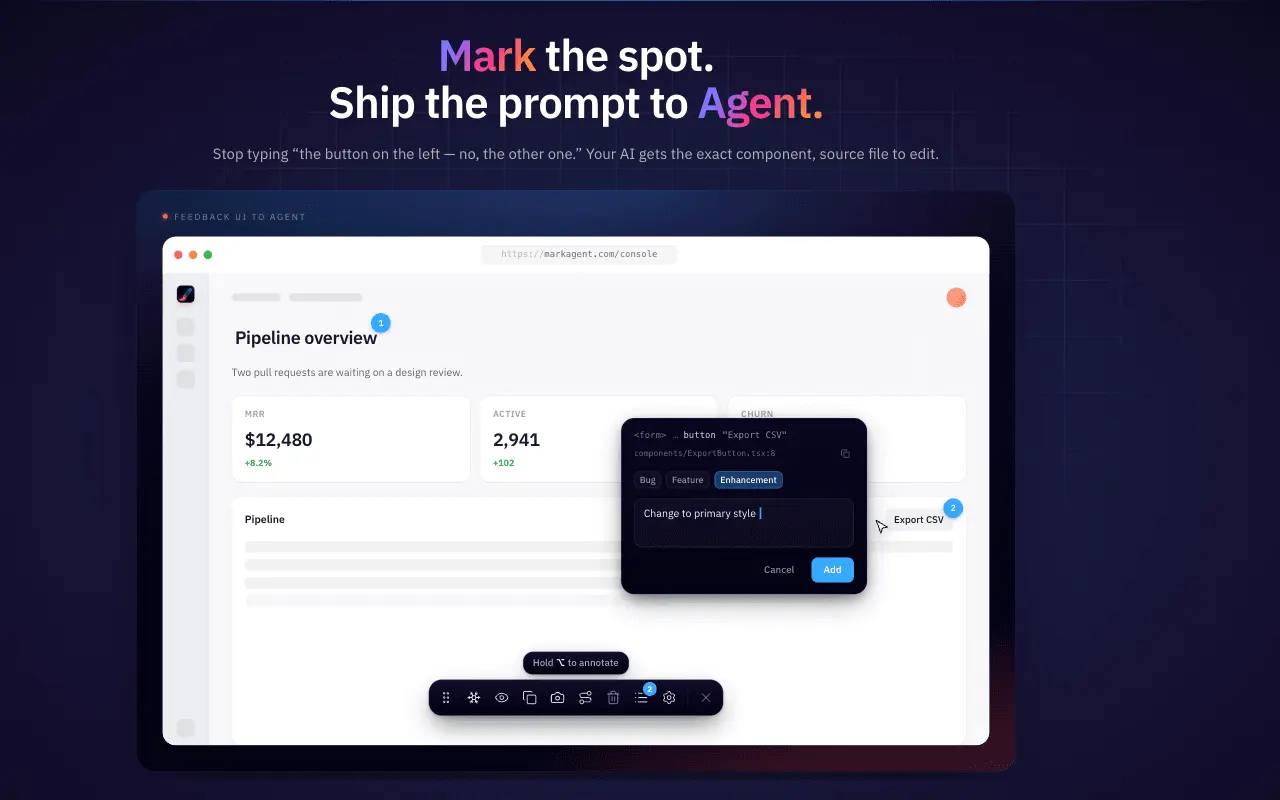
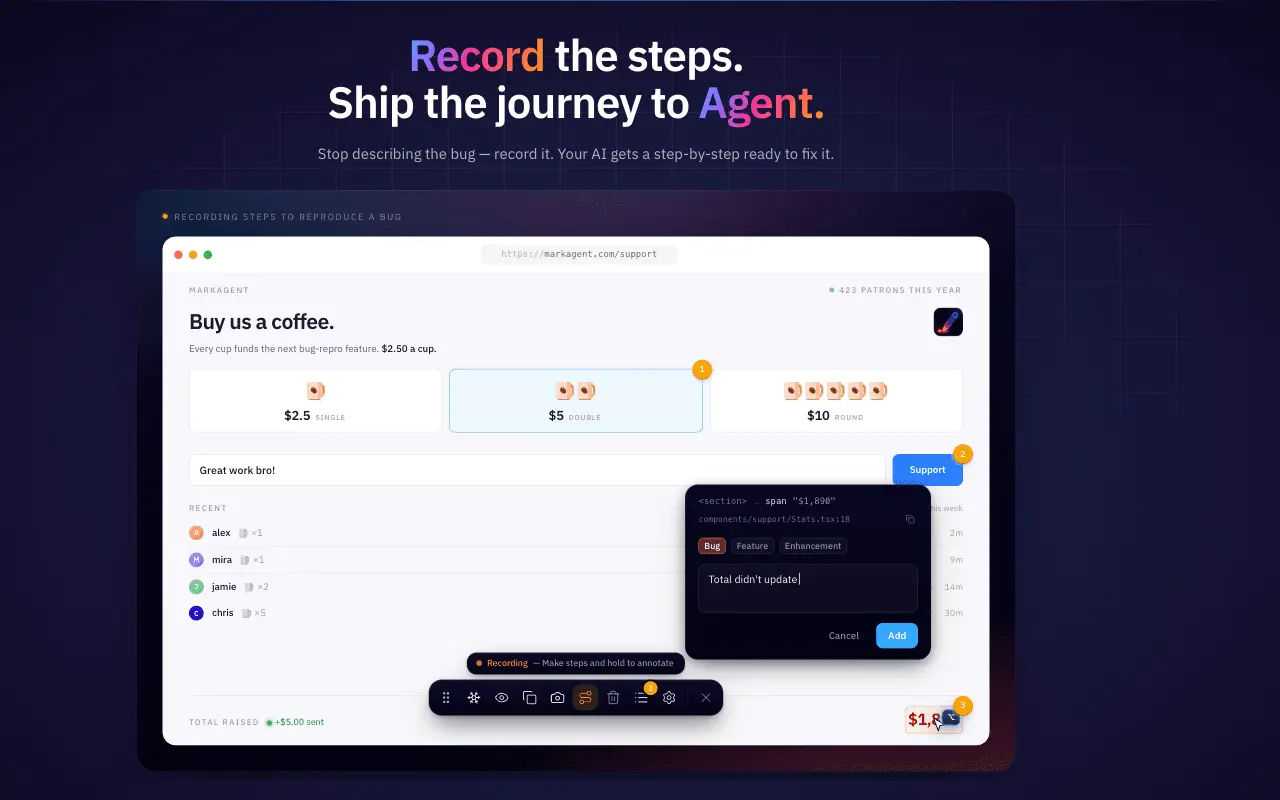
## The bug-report tax If you've spent any time vibe coding with Claude Code, Cursor, or Codex, you know the tax. You spot something off in the UI. A button is two pixels misaligned. A modal closes on the wrong click. A loading state flickers. So you start typing. > "Hey, on the dashboard page, the second button in the top-right toolbar, no, not the one with the icon, the *other* one, when I click it..." Three paragraphs in, you're describing pixels instead of fixing them. The agent half-guesses. You end up screenshotting anyway, pasting it in, then explaining the screenshot. Round trip after round trip. I built Markagent to delete that loop. ## What Markagent is Markagent is a Chrome extension for sending UI feedback to AI coding agents. You press Cmd+Shift+. (Mac) or Ctrl+Shift+. (Windows / Linux) to bring up the toolbar, hold Cmd or Ctrl and click any element on any webpage, leave a note, and hit Copy. Out comes a structured markdown prompt your agent can act on immediately. Not a vague description, not a raw screenshot, a real artifact with the React component name, the source file path (in dev mode), the DOM context, a stable CSS selector, the page URL, the viewport size, a screenshot, and your note. Paste it into Claude Code, Cursor, Codex, OpenCode, Antigravity, v0, Bolt, Lovable, ChatGPT, Gemini, Copilot, anything that takes text. The agent jumps to the right component and edits the right line on the first try. A screenshot tool saves images. Markagent ships the prompt. ## The anatomy of one click Here's roughly what comes out of a single annotation (simplified): ```markdown ## UI feedback Page: https://app.example.com/dashboard Viewport: 1440x900 Element: <button class="cta-primary">Save changes</button> Component: <SaveButton /> (src/components/forms/save-button.tsx) Selector: main > section.form-wrap > form > button.cta-primary Note: This button sits 2px too low against the input row, and the hover state has no transition. Should match the cancel button. Screenshot: [attached] ``` That's not a bug report. That's a prompt your agent can execute against. ## Journey Mode for multi-step bugs Single-element annotations are great for polish. The harder ones are sequences. "Click here, then here, submit this form, the wrong toast appears." Flip Journey Mode on. Markagent silently records every click as a numbered, screenshot-backed playthrough. You stop recording, hit Copy, and the markdown hands your agent the exact sequence to replay. No more "Step 1: Open the app. Step 2: Click the button." Your clicks are the steps. ## Who actually uses this Same artifact, different readers. Vibe coders stop typing "this button, that menu, no THAT one." Designers stop circling pixels in red on Slack; one pin proves the misalignment. Frontend engineers get the source file path with one click. PMs stop describing every tweak in prose. QA testers stop writing "Step 1: Open the app," because their clicks become the repro. Non-developers can annotate a bug and hand the markdown to engineering. The developer reads it like a normal ticket, then forwards the same markdown straight into Claude Code. One file, two audiences, no translation. ## Works with every AI tool that reads text The export is plain markdown. If your AI tool has a text box, it works. Tuned export templates ship for the major coding agents: Claude Code, Cursor, Codex, OpenCode, and Antigravity. The same markdown drops into vibe-coding platforms like v0, Bolt, and Lovable, conversational assistants like ChatGPT, Gemini, and Copilot, and local LLMs running through Ollama or LM Studio. At the end of the day it's just text. Paste it anywhere. ## Localhost, staging, internal tools Markagent works on anything you can open in your browser. Localhost. Staging URLs. Internal dashboards. Authenticated sites. In dev mode it reads the React source-file path directly, so your agent doesn't have to guess which file owns the component. ## The principles This is the part I care about most. 100% local. Screenshots, notes, exports never leave your browser. Zero outbound requests, ever. Verify it yourself in Chrome DevTools' Network tab. Zero telemetry. No analytics. No tracking. No accounts. No cloud sync. Free forever. No paid tier, no upsell, no "Pro" plan waiting in the wings. Every Chromium browser. Chrome, Edge, Brave, Arc, all of them. Firefox is on the roadmap. Markagent is the kind of tool I wanted to exist, so I made sure it would still exist five years from now without a pricing page. ## Try it [Add Markagent to Chrome](https://chromewebstore.google.com/detail/hbmbjdgdofkpddalhjoapppnkoicpdjj?utm_source=peerpush) Site: [markagent.avibebuilder.com](https://markagent.avibebuilder.com) Pin it to your toolbar. Press Cmd+Shift+. (Mac) or Ctrl+Shift+. (Windows / Linux) on any page. The next time you catch yourself typing "the third button from the left" to your AI agent, click it instead.
Screenshots
Reviews (1)
Average 5.0 out of 5
Based on 1 review

super goood product, i recommend
Comments (1)
Instead of manually describing UI updates in a clunky, non-visual way, you can now click directly on the elements you want to change on the web, add notes, and copy/paste the generated prompt into Cla