
CaretQ
Shows your keyboard layout next to the cursor on Windows

Details
- Follow on
- Target Audience
- Pricing
- One-time from $2.99
- Platforms
- Featured in
Discovery signals
How AI and people discover CaretQ on PeerPush
About CaretQ
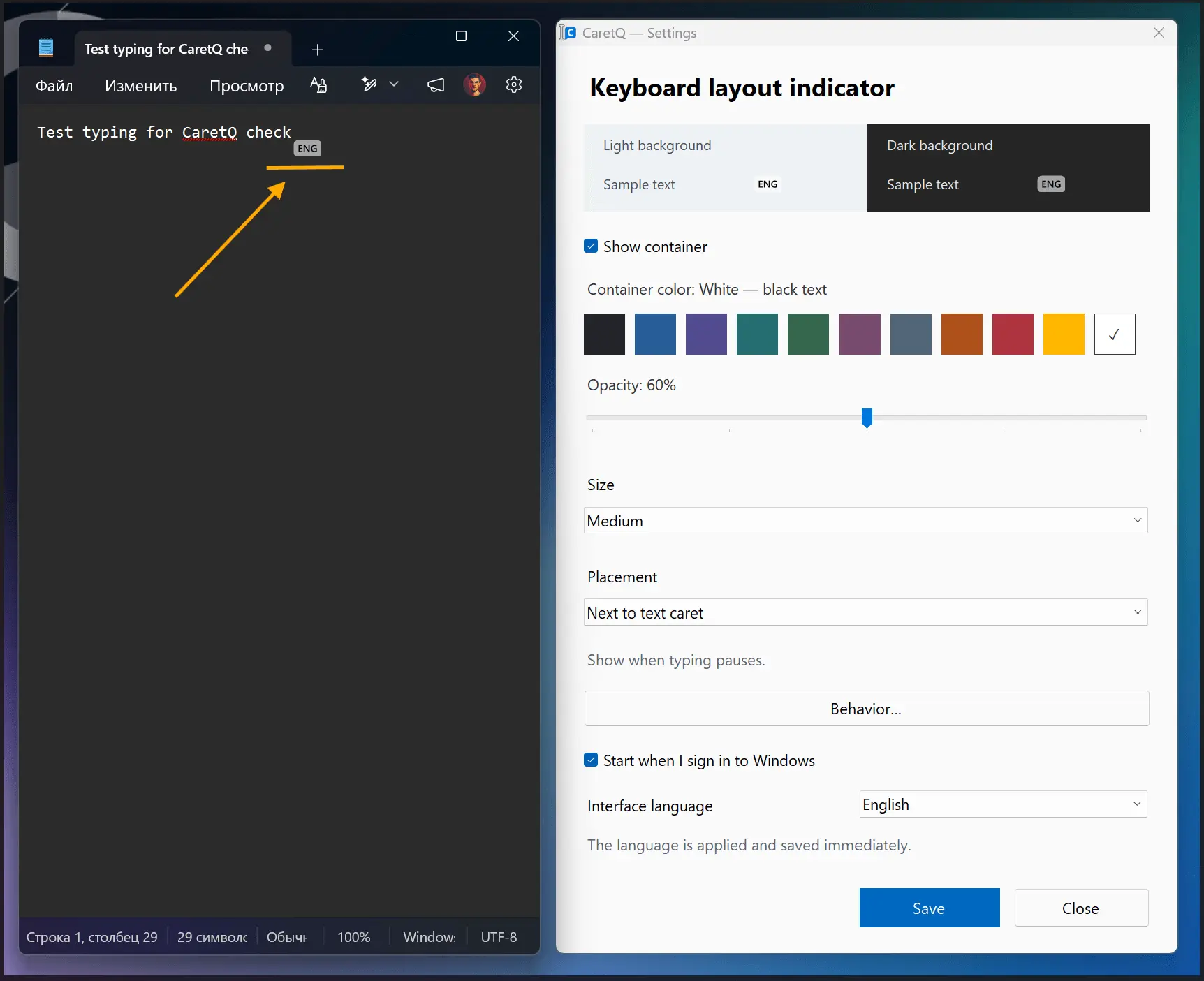
CaretQ shows your current keyboard layout beside the mouse pointer or text caret, so you can spot the wrong input language before you type. Choose between two positions, and display the hint constantly, after a typing pause, or auto-hide after a set time. Customize size, container color and opacity, and text color. Control everything from the tray icon. The interface is available in Russian and English, with optional launch at Windows startup. CaretQ processes layout and cursor position locally and does not record or transmit typed text, passwords, or clipboard contents. It contains no ads or third-party analytics. All features are available in a 7-day free trial; continued use requires a one-time purchase, with no subscription. Hint display depends on standard Windows accessibility support in each application, so caret detection may be limited in some non-standard input fields.
Product Video
Watch a video demo of CaretQ.
Screenshots
Reviews (0)
No reviews yet. Be the first to rate this product!
Comments (1)
The cursor-side hint addresses a small but real multilingual writing problem. Does it distinguish Japanese IME on/off modes as well as keyboard layouts? That would be useful when switching between Japanese and English.