
FlowGuard
Monitor n8n workflows for silent failures

Details
- Target Audience
- DevelopersAgenciesSolopreneurs
- Pricing
- Freemium
- Platforms
- Web
Discovery signals
How AI and people discover FlowGuard on PeerPush
- Claude
- ChatGPT
- Perplexity
- +1 other AI crawlers
Reads by these AI engines
Crawlers behind these engines read this listing on PeerPush.About FlowGuard
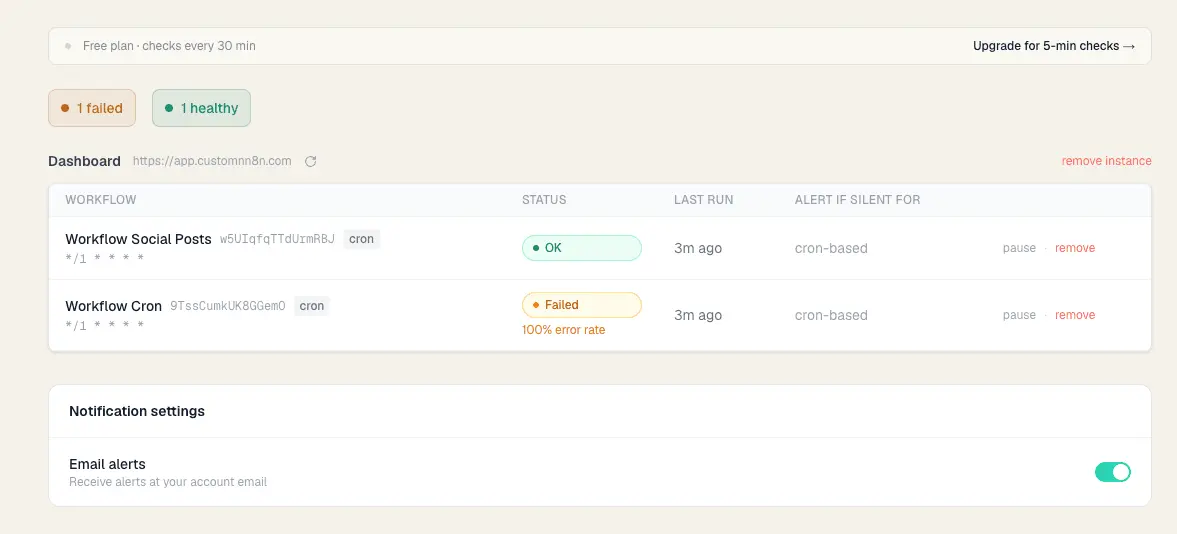
FlowGuard: Silent Workflow Monitoring for n8n If you run n8n workflows for yourself or for clients you already know the problem: n8n tells you when a workflow fails, but it says nothing when a workflow simply stops running. A scheduled automation that was supposed to fire every hour hasn't run in three days. No error. No alert. No trace. Just silence. And somewhere downstream, data isn't syncing, invoices aren't going out, or a client's CRM is quietly going stale. That's the silent failure problem. And it's the one n8n doesn't solve out of the box. FlowGuard fixes that. FlowGuard connects to your n8n instance via API and continuously monitors the last execution timestamp of every workflow you care about. You set a silence threshold say, 2 hours for a workflow that should run hourly and the moment that threshold is exceeded without a successful run, FlowGuard sends you an email alert. No webhooks. No modifying your existing workflows. No extra nodes to wire up. No infrastructure to maintain. You paste your n8n URL and API key, pick your workflows, set your thresholds, and you're done. Setup takes about 60 seconds. Who it's for: n8n self-hosters who run critical automations and can't afford to find out something broke three days later Freelancers and agencies managing n8n instances for clients because your clients don't care that n8n didn't throw an error, they care that the automation didn't run Anyone who has ever said "wait, when did this workflow last actually run?" Why not just use Uptime Kuma or a push monitor? You can and many people do. The common workaround is to add a final node to every workflow that pings a monitoring service. It works, but it has real costs: you have to modify every workflow individually, you have to remember to wire up every new workflow you create, and if the workflow partially runs but the final ping node doesn't fire, you get a false positive. FlowGuard doesn't need to be inside your workflows. It watches from the outside, through the n8n API, the same way you'd check execution history in the n8n UI just automated, continuous, and with alerts. The result: you always know your automations are actually running. Not just that n8n is online. Not just that the last execution didn't error. That the workflow ran, on schedule, when it was supposed to.
Screenshots
Reviews (1)
Average 4.0 out of 5
Based on 1 review

Comments (0)
No comments yet. Be the first to share your thoughts!