MixDesk X
The mixing console for your computer's audio. Free.

Details
- Follow on
- @adelvoio
- Categories
- Video & Audio Tools
- Target Audience
- Content CreatorsGamersBroadcasters
- Pricing
- Free
- Platforms
- Desktop
Discovery signals
How AI and people discover MixDesk X on PeerPush
- ChatGPT
- Perplexity
- Claude
- +4 other AI crawlers
Reads by these AI engines
Crawlers behind these engines read this listing on PeerPush.About MixDesk X
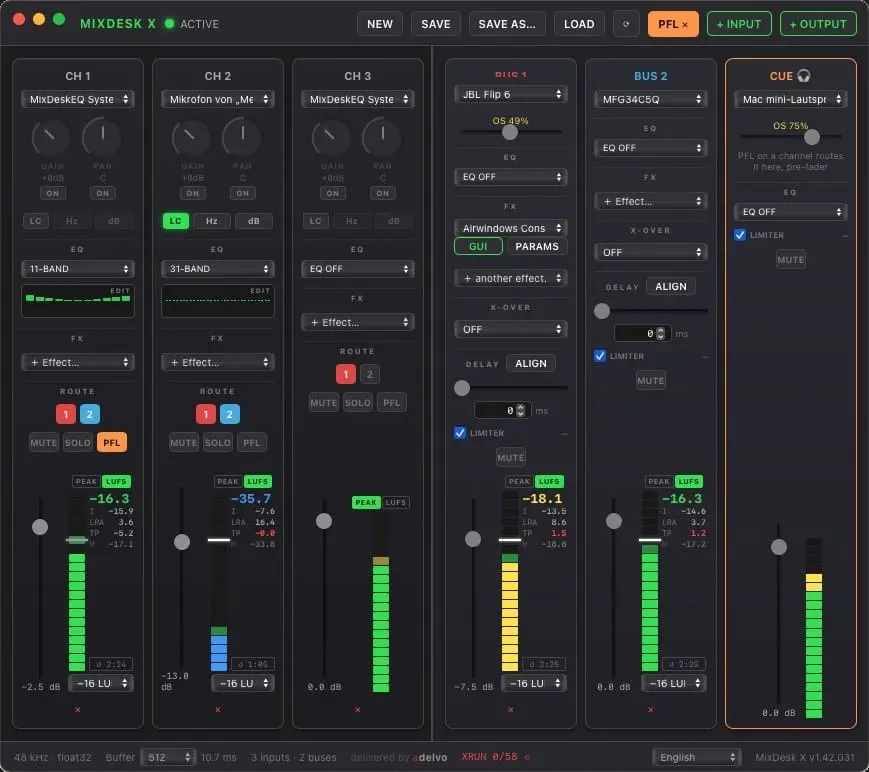
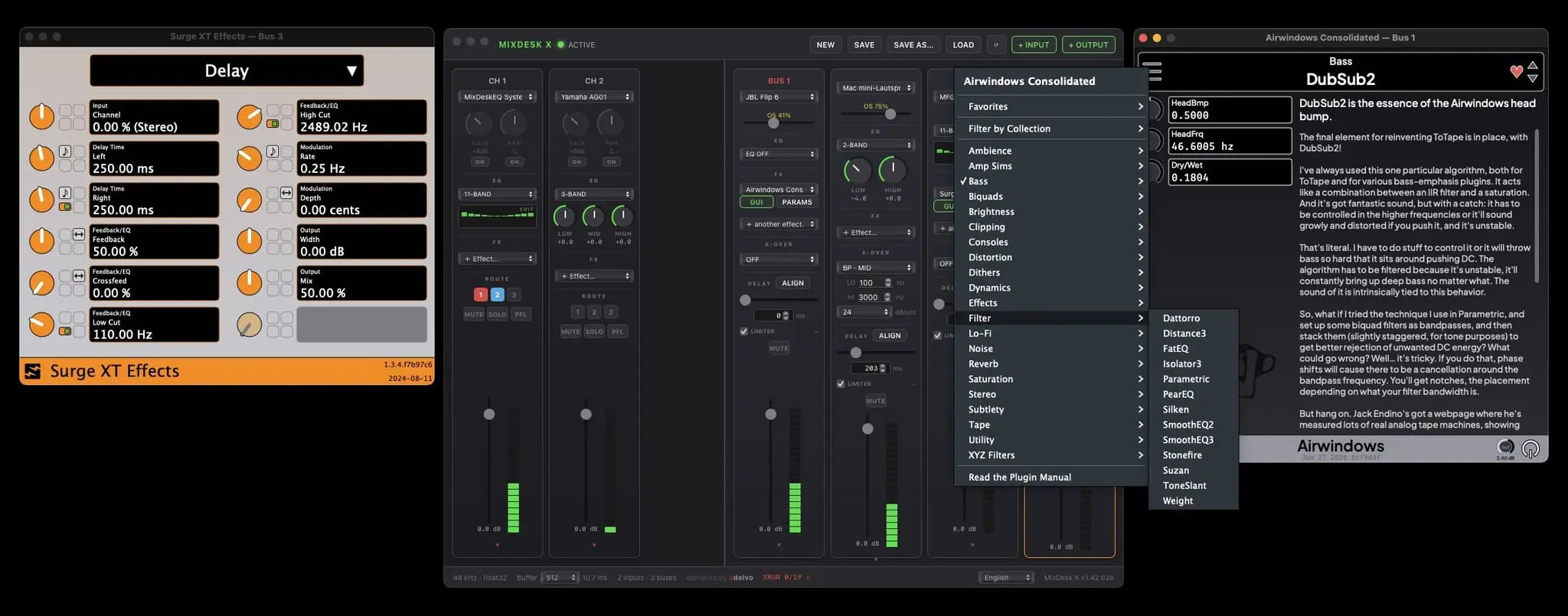
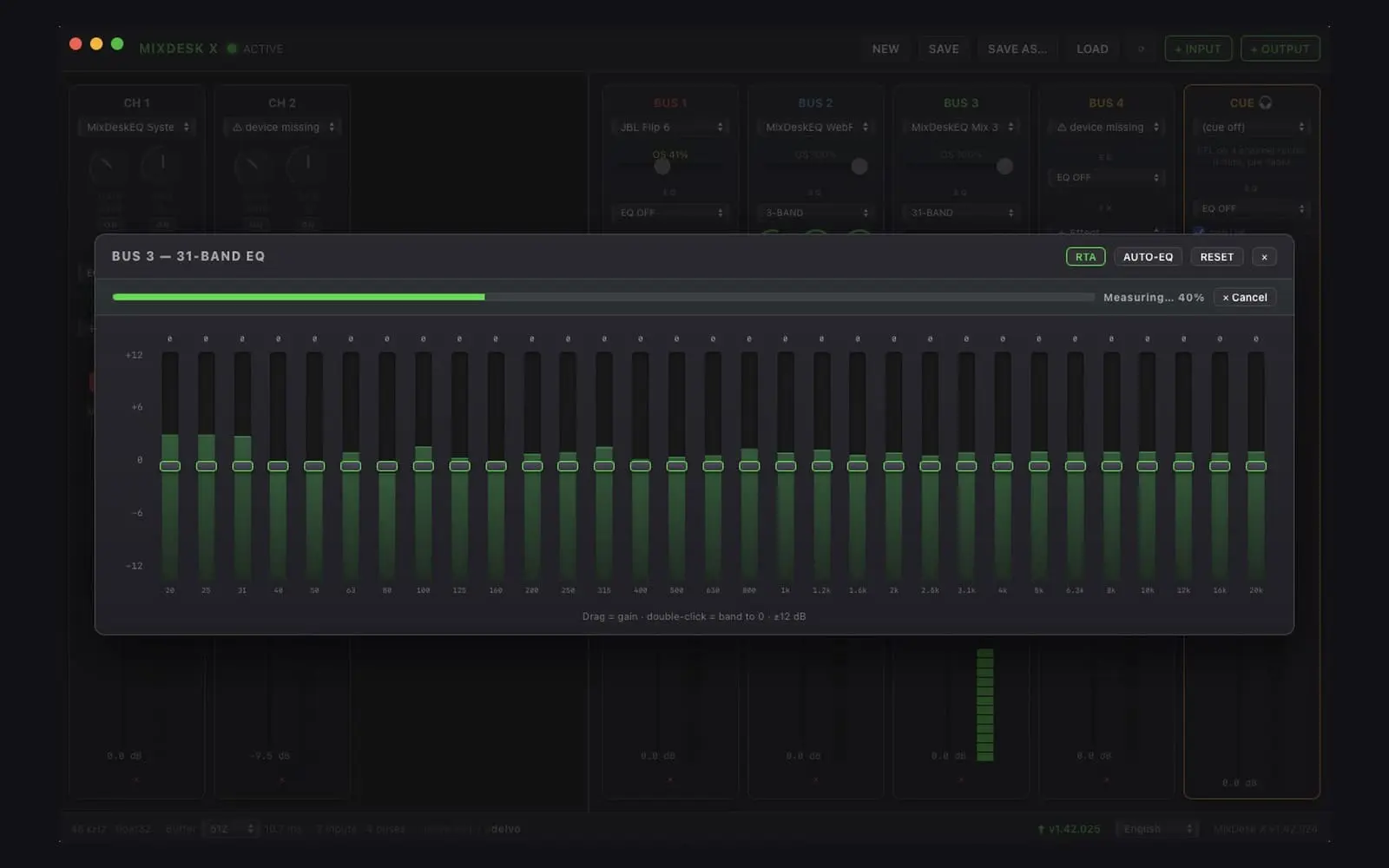
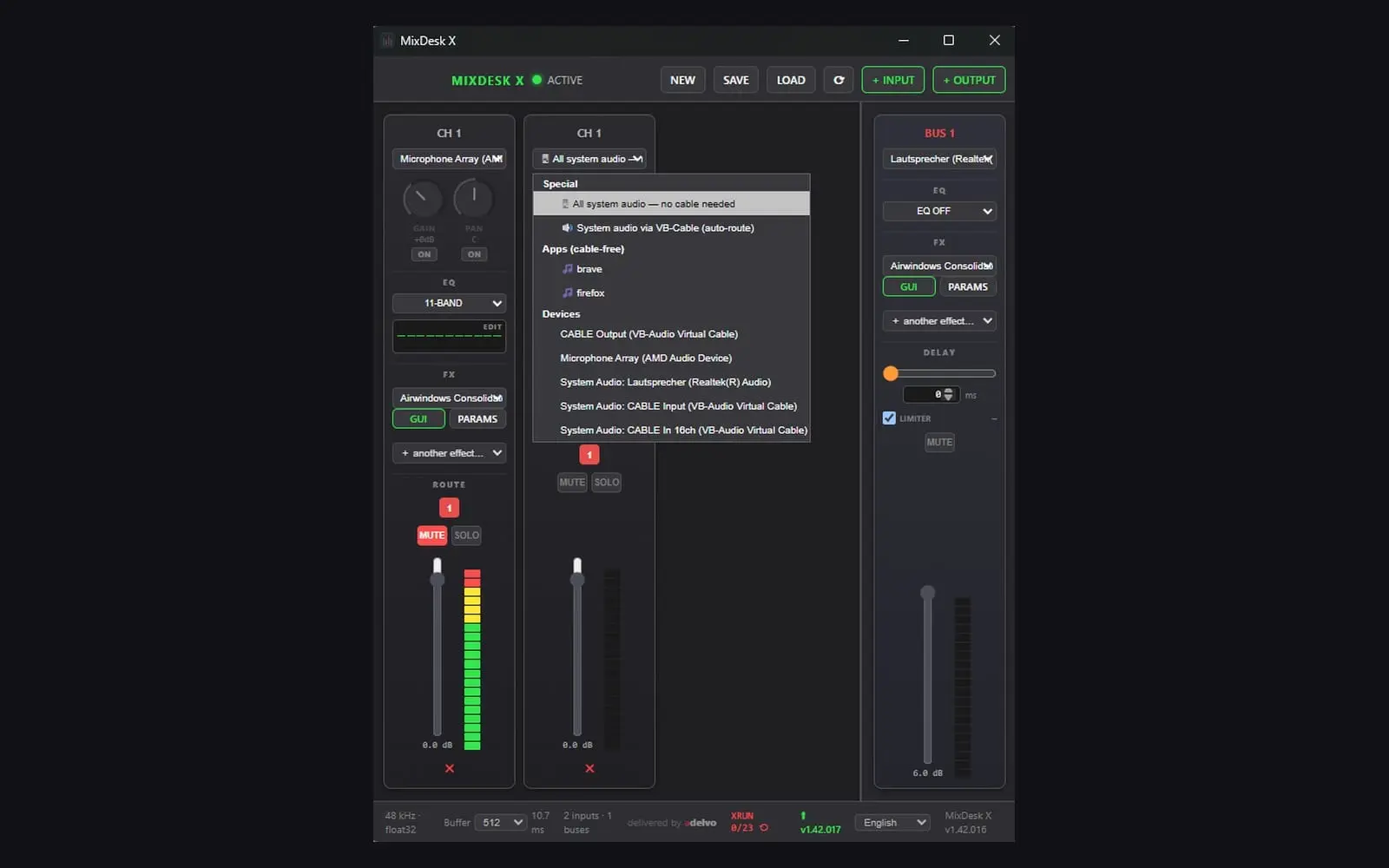
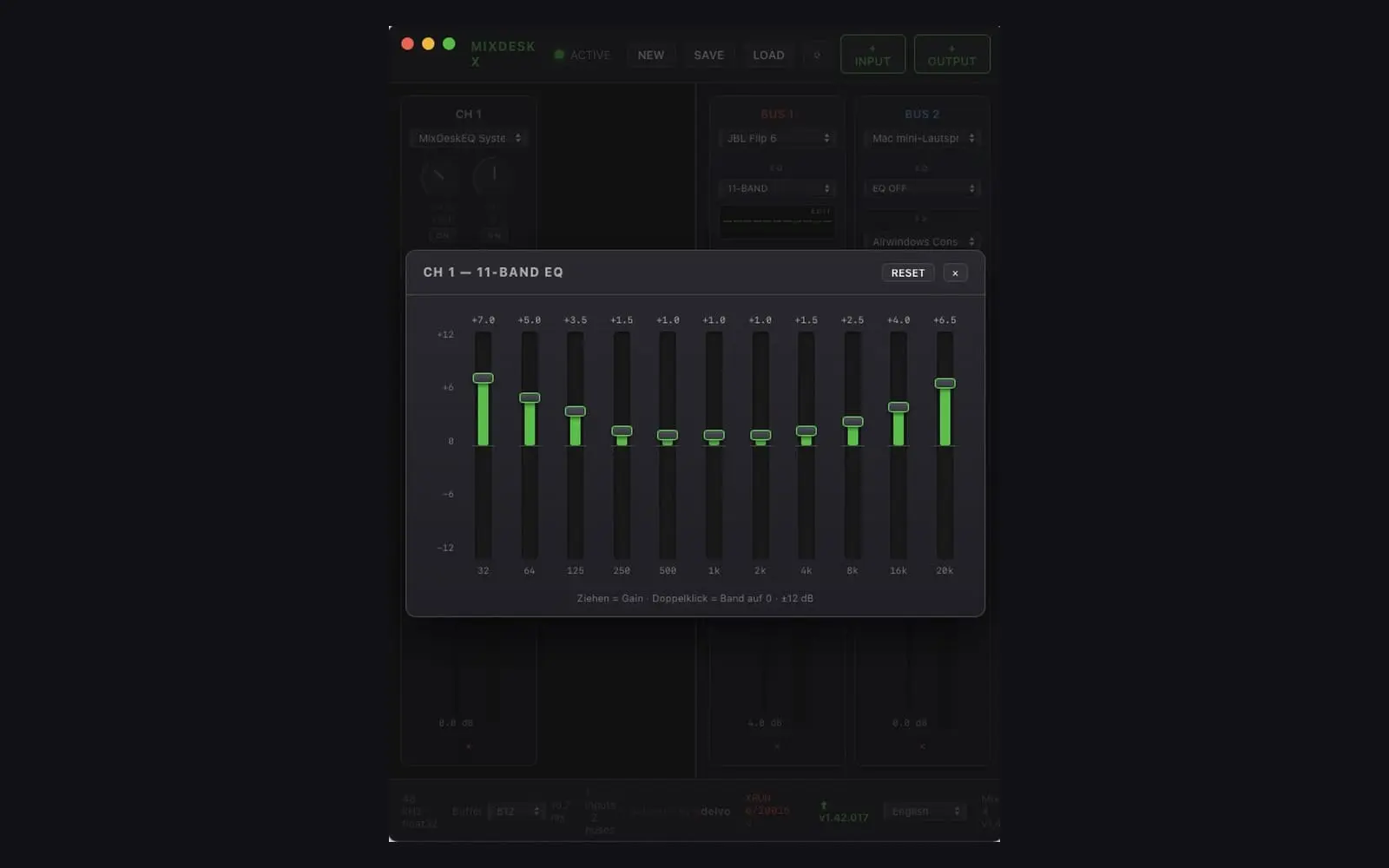
MixDesk X is a free mixing console and live-PA processor for everything your computer plays and records. System and per-app audio capture without virtual cables (ScreenCaptureKit on macOS, WASAPI Process Loopback on Windows). Up to 16 stereo output buses, 2/3/11/31-band EQ on every channel, a live RTA with one-click Auto-EQ. DriveRack-style crossover and automatic delay-line alignment. Feedback destroyer and per-mic rumble filter. Per-bus delay for Bluetooth sync or Stadium & X-Over runtime delay-line automatic measurement, and a safety limiter on every output. LUFS loudness metering (ITU BS.1770 / EBU R128) on every input and output: Momentary, Short-term, Integrated, loudness range and true peak, with a target line from −23 to −14 LUFS. Peak hold on every meter and in the RTA. Cue / PFL headphone output with its own device, EQ and limiter. Global keyboard shortcuts for mute, louder and quieter on every channel — freely assignable, working while MixDesk X is in the background. Local HTTP control for Touch Portal and scripts: /api/ch//mute, /up, /down, /volume. One-click Bitfocus Companion export for Stream Deck Mini, 15, XL, + and + XL, with live level, peak hold and mute state on the keys. On the Stream Deck + every dial is a channel. CLAP plugin host with ~400 free effects via the Airwindows Consolidated pack. Chains, settings and shortcuts are saved with your setup. One app instead of five, and only what you enable sits in the signal path. macOS (Apple Silicon) and Windows 10/11 (x64 & ARM64), 16 UI languages. Completely free — no Pro tier, no account. Clap Effects Chain, Equalizer, Balance, Gain, 31 Band, 11 Band, 2 Band, 3 Band, Limiter, Real Time Analyzer, Sync Delay, Feedback Destroyer, Low Pass, X-Over, Multi Out, Multi In, LUFS Meter, Loudness, EBU R128, True Peak, Peak Hold, PFL, Cue, Hotkeys, HTTP API, Stream Deck, Bitfocus Companion, vMix Audio.
Screenshots
Product Updates (9)
v1.42.032 MIXDESK X October 2026
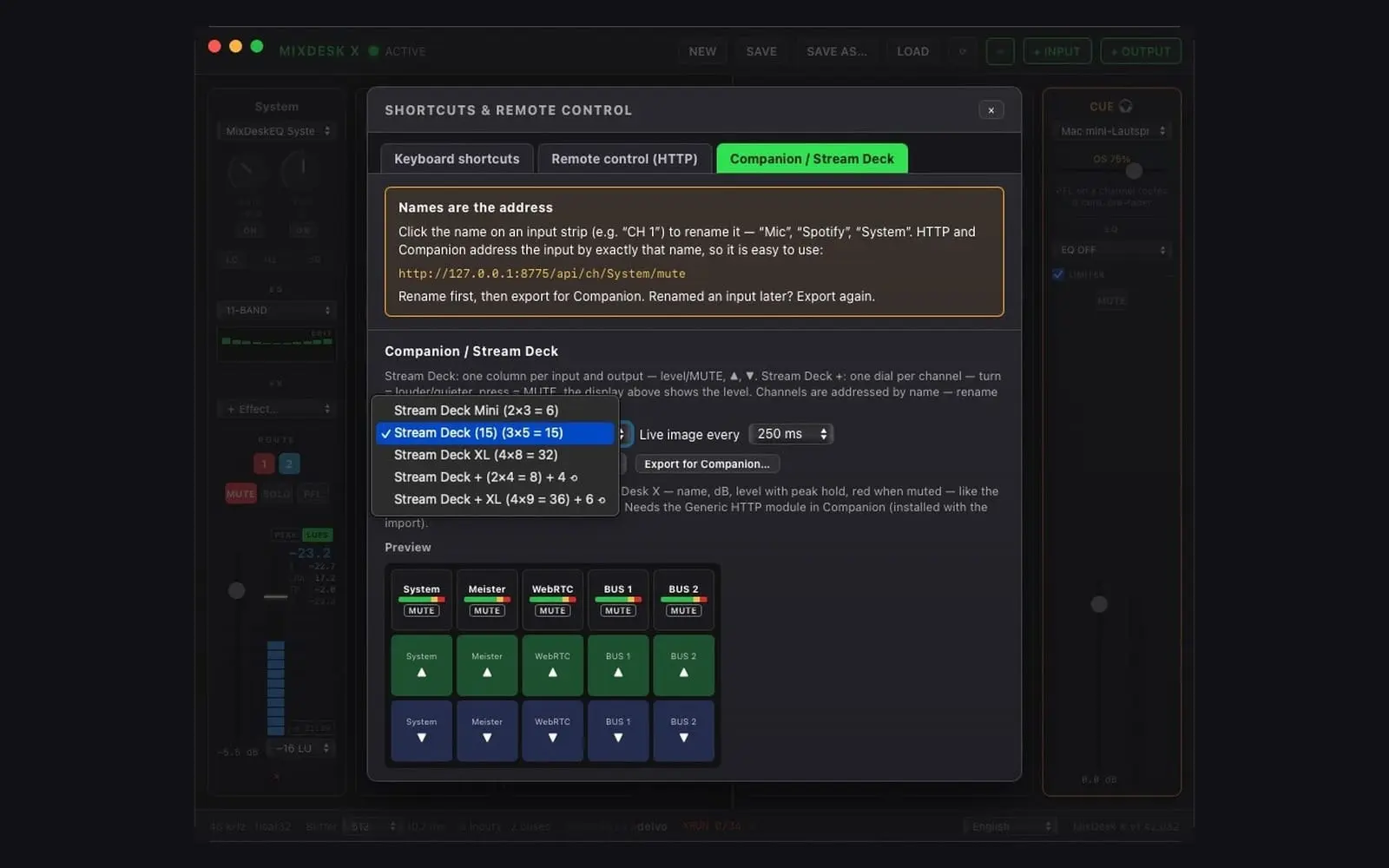
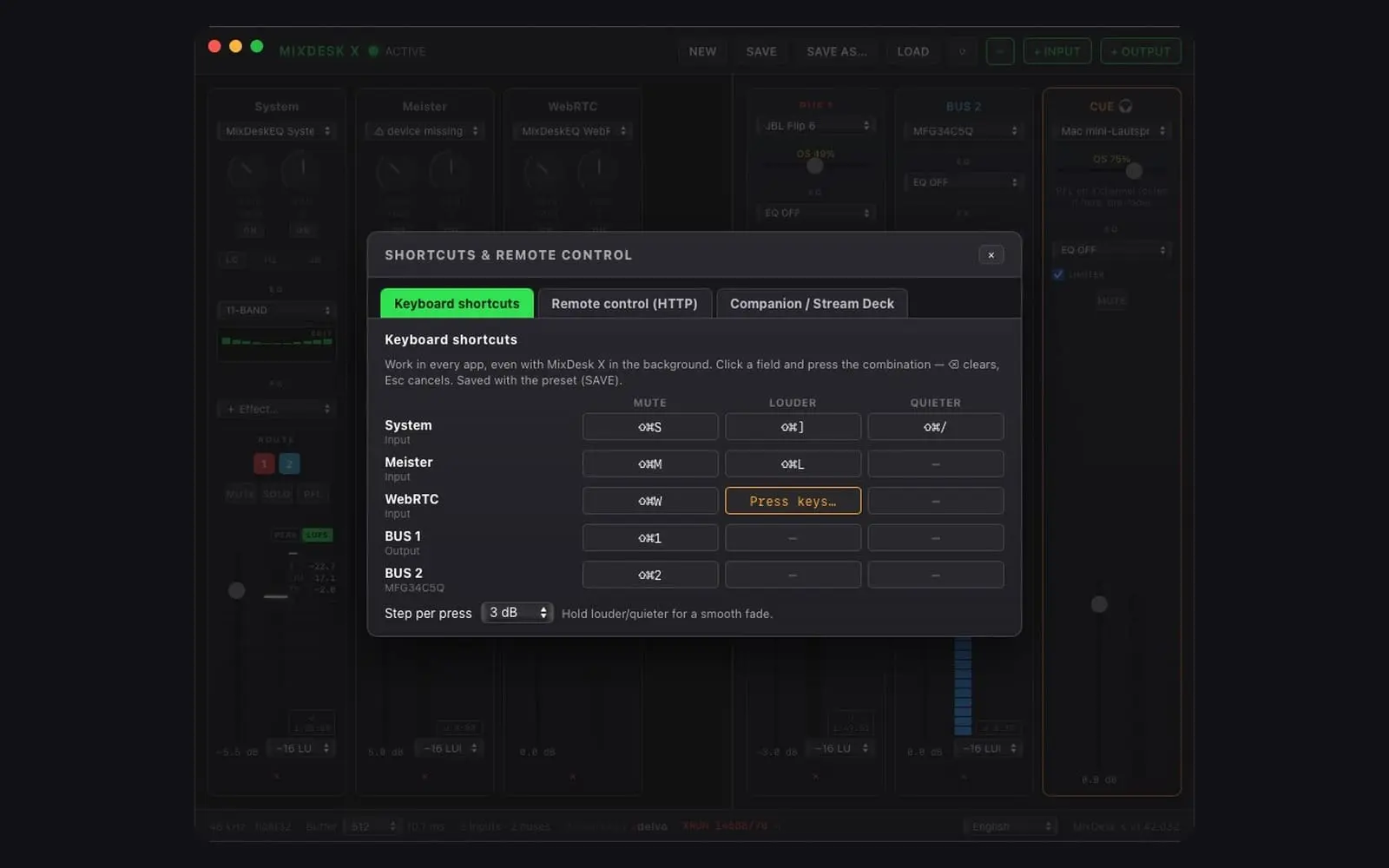
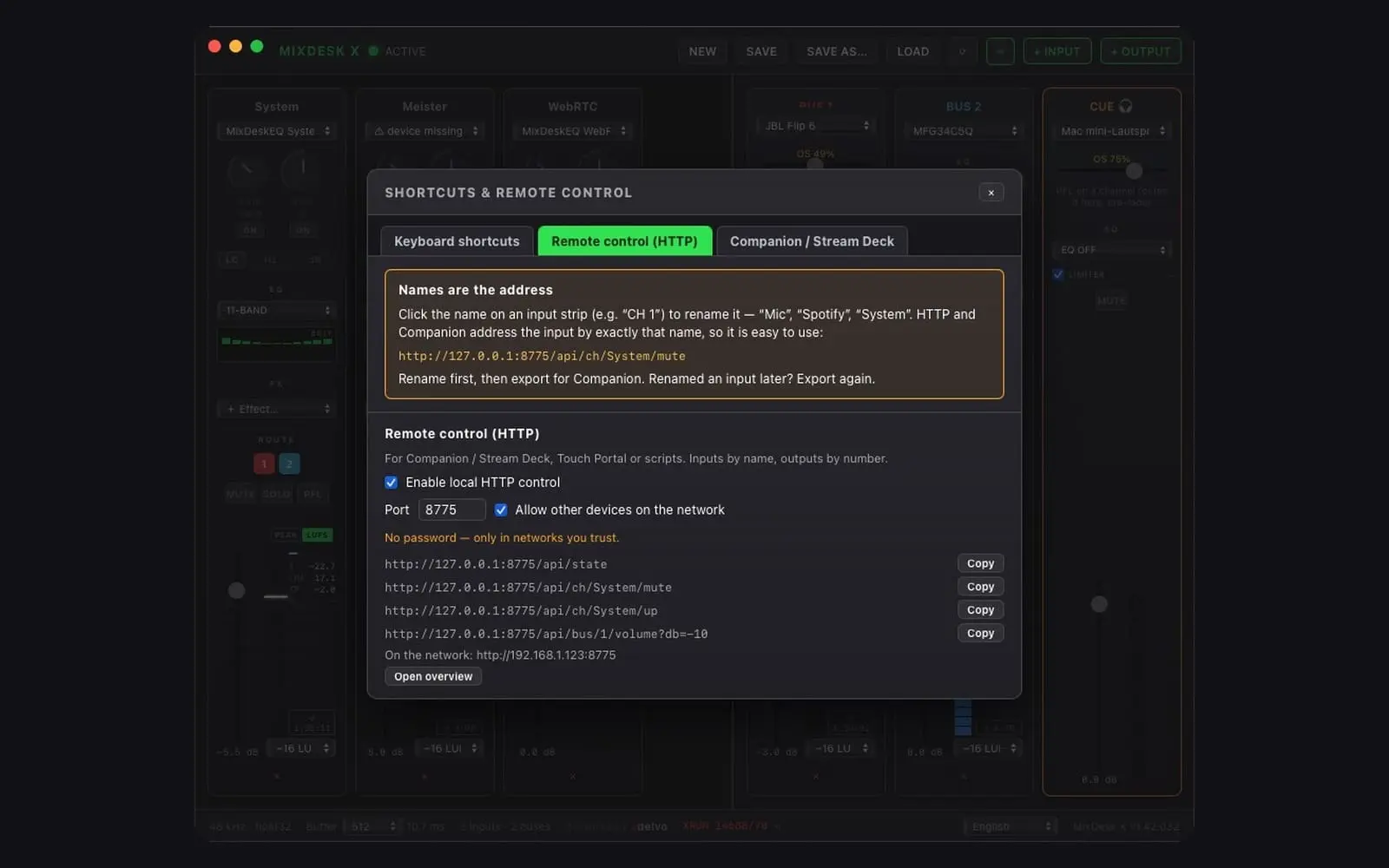
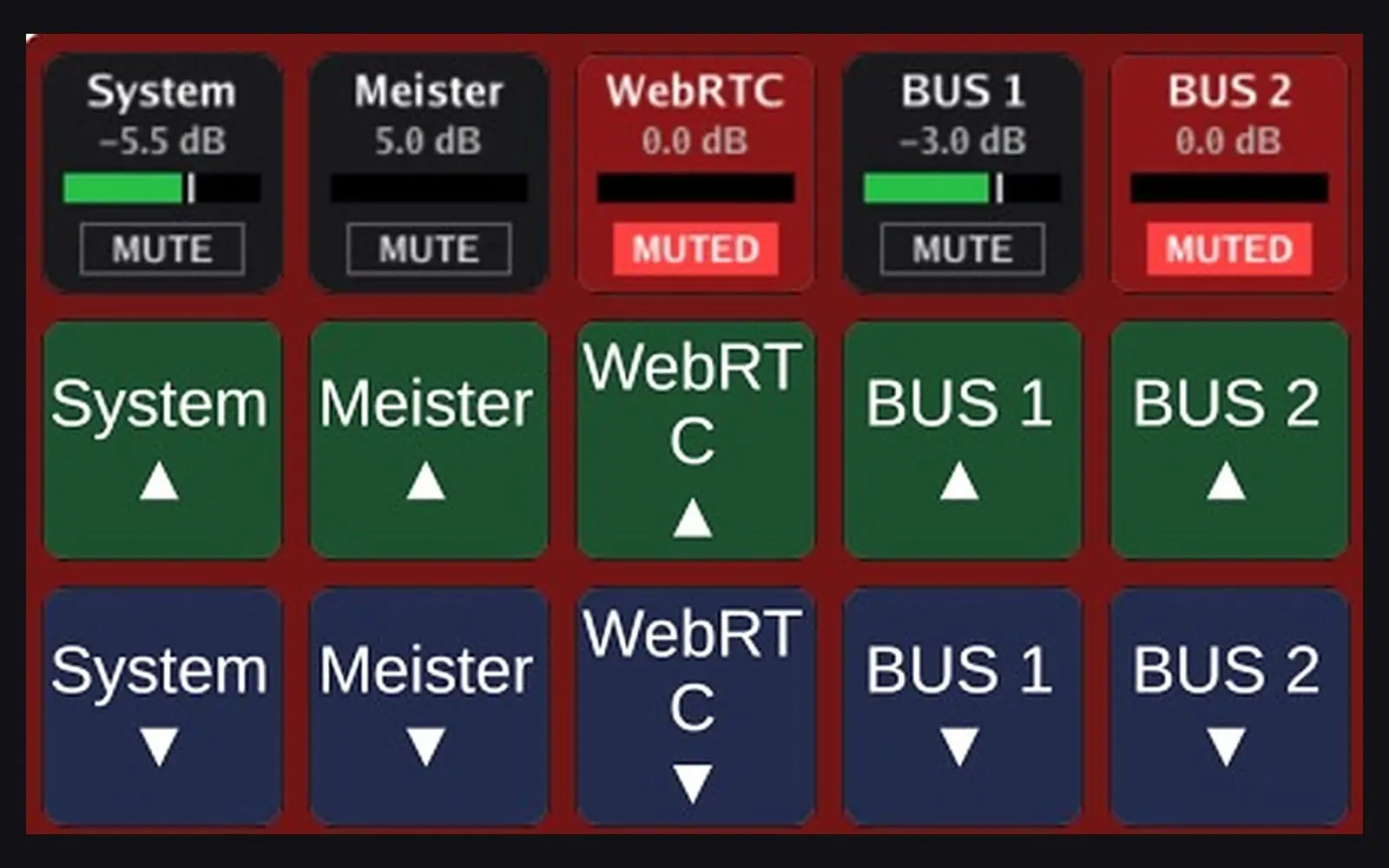
Remote control — hotkeys, HTTP and Stream Deck. Suggested on GitHub: mute, louder and quieter for every input and output without bringing the window to the front. Everything sits behind the new ⌨ button left of + INPUT. ✦ Global keyboard shortcuts Freely assignable like in OBS: per input and output one combination each for mute, louder and quieter. Nothing is assigned out of the box. Work in every app, even with MixDesk X in the background. Hold louder/quieter for a smooth fade, step 0.5–6 dB. No Accessibility permission on macOS; a combination already used by another app is reported in the dialog. Saved with the preset. ✦ Local HTTP control Off by default, local only, optionally open to your network. Plain GET requests such as /api/ch/System/mute, /api/ch/System/up, /api/bus/1/volume?db=-10 and /api/state — for Touch Portal, scripts or anything that can call a URL. Names are the address: rename a channel (click “CH 1”) and use that name in the URL. ✦ Companion / Stream Deck export One click writes a page for Stream Deck Mini, 15, XL, + and + XL, with a preview of the layout in the dialog. The keys show name, dB, level with peak hold and mute state live, like the vMix module does for vMix — drawn by MixDesk X and fetched by Companion's Generic HTTP module, no extra module needed. Stream Deck +: one dial per channel — turn for level, press to mute, the display above shows the level.
Comments (0)
No comments yet. Be the first to share your thoughts!
v1.42.031 MIXDESK X October 2026
Loudness metering — LUFS on every strip, and peak hold everywhere. Clients and platforms specify loudness, not level: −23 LUFS for EBU R128, −24 for US broadcast, −16 or −14 for streams. A dB meter cannot even check that. MixDesk X now measures it, on inputs and on outputs, after everything that vMix or your mixer did. ✦ LUFS meter (ITU-R BS.1770-4 / EBU R128) PEAK | LUFS switch above every meter, inputs and output buses. LUFS mode shows Momentary as the bar, Short-term as the big number, plus Integrated, LRA and True Peak (4× oversampled), the measuring time and a reset for the start of the show. Pick a target (−23, −24, −20, −18, −16, −14 LUFS): a white line marks it in the bar, the bar is green within ±1 LU, yellow within ±3, red when too loud, blue when too quiet. True peak turns red above −1 dBTP. Measured where it counts. Output buses meter after the limiter, that is the signal leaving the machine; inputs meter after gain and pan, that is what reaches the buses. Feed the vMix master into an input via the virtual audio device and you read the real program loudness, post every fader — which a VST inside vMix cannot do, it sits pre-fader. The meter only computes while the switch is on LUFS; the strip remembers its mode. The K-weighting is derived for the engine sample rate and matches the BS.1770 reference coefficients exactly at 48 kHz. MixDesk X 1.42.031 — channel strips with the PEAK | LUFS switch, loudness values and target line on inputs and output buses ✦ Peak hold Every VU meter holds its top LED for 1.5 s, then lets it fall segment by segment until the next peak picks it up again — you see what actually happened instead of flicker. The RTA in the 31-band EQ gets the same: a hold line per third-octave band. ✦ Also New app icon for macOS 26/27 (glass, no grey plate).
Comments (0)
No comments yet. Be the first to share your thoughts!
v1.42.030MIXDESK XSeptember 2026
New mic tools — a feedback destroyer and a low-cut filter. MixDesk X keeps growing into the software system processor that replaces the 19″ rack: after the 31-band EQ, RTA, active crossovers and measured delay alignment, every microphone channel now has automatic feedback suppression and a rumble filter. ✦ Feedback Destroyer Automatic feedback suppression per mic channel (armed from the 31-band EQ): it watches for a sustained feedback tone that sits on one exact frequency and drops a narrow notch on it — while your voice, which drifts in pitch, is left alone. Two modes like a hardware AFS: LIVE places adaptive notches that release again once the frequency goes quiet; FIXED is for ringing out a soundcheck — raise the gain slowly and it parks filters as tones appear, buying you headroom before feedback. Honest by design: a software processor at the very end of the chain will not out-react a hardware DriveRack at the absolute feedback edge — it raises your threshold, it does not work miracles. Pair it with the low-cut. Feedback Destroyer auto-notching sustained feedback in the 31-band EQ, with the live RTA behind the bands ✦ Low-Cut / rumble filter A switchable high-pass on every input channel — 40 to 160 Hz, 12 or 24 dB/oct (Butterworth). It sits first in the channel, before the feedback destroyer and EQ. Strips microphone rumble, handling noise and low-frequency feedback with zero latency — the reliable fix for the low-end drone a detector can never chase fast enough. The clean split: the low-cut kills the lows, the destroyer handles the mid-range whistles.Saved in presets. Per-channel low-cut / rumble filter with its frequency dropdown, 120 Hz selected ⬇ Download MixDesk X (macOS · Windows x64 · Windows ARM64)
Comments (0)
No comments yet. Be the first to share your thoughts!
MixDesk X 1.42.029 — 16 UI languages Latest
Language offensive. Seven new interface languages join the console: Suomi, Svenska, Polski, Čeština, Dansk, Nederlands and Română — alongside English, Deutsch, Español, Français, Italiano, Português (BR), 日本語, 한국어 and 中文. 16 in total. All tooltips, dialogs, toasts and warnings are fully translated — including the new X-OVER and ALIGN features from v1.42.028. The operational console labels (MUTE, SOLO, PFL, EQ, FX, GAIN, PAN, DELAY, LIMITER…) deliberately stay in English — the same convention as on hardware consoles worldwide. Switch languages any time in the footer; the choice is remembered. Downloads are served from adelvo.io first; this release page is the full mirror and automatic fallback.
Comments (0)
No comments yet. Be the first to share your thoughts!
MixDesk X 1.42.028 — Active crossovers & measured delay alignment
Active crossover on every bus (X-OVER) Three modes per bus: LP · SUB (lowpass), HP · TOP (highpass) and BP · MID (bandpass with two crossover frequencies) — 2-way sub/top splits and full 3-way + sub systems, each way on its own bus and output device. Linkwitz-Riley slopes of 12, 24 or 48 dB/oct — both ways sum flat and in phase at the crossover point. The 12 dB/oct case inverts the sub way internally, exactly like hardware crossovers. Sits after EQ/FX and before the bus delay, so RTA and Auto-EQ keep measuring full-range. Saved in presets; old presets load unchanged. Delay measurement & one-click alignment (ALIGN) The new ALIGN button plays a measurement chirp alternately through a reference bus and the selected bus, picks it up through any input channel (your measurement mic) and locates it with an FFT matched filter — sample-accurate. Made for Bluetooth: BT latency changes on every reconnect — measure, apply, done. The earlier way gets the delay; nothing changes until you confirm. Four passes with median, an honest ± spread readout and a signal-quality gate. Works for crossover ways too: measure sub against top and your active system is time-aligned. Downloads are served from adelvo.io first; this release page is the full mirror and automatic fallback.
Comments (0)
No comments yet. Be the first to share your thoughts!
MixDesk X 1.42.026 — In-App Updates
MixDesk X now updates itself. When a new version is available, the footer pill installs it in-app: one click, MixDesk X downloads the update, verifies its code signature (Developer ID on macOS, Authenticode on Windows — nothing unsigned is ever touched), swaps itself and relaunches. macOS: the update is verified (Apple code signature + Team ID + version) before anything is replaced; if any step fails, your current version keeps running and the pill falls back to the download page. Windows: works for both the portable EXE (no admin needed) and installer-based setups (one UAC prompt, silent install). This release is the last one you install by hand — from now on, updates arrive through the pill.
Comments (0)
No comments yet. Be the first to share your thoughts!
MixDesk X 1.42.025 — PFL & cue: a real headphone section
New: PFL button on every channel Every channel strip now has a PFL button next to MUTE/SOLO — press it and the channel is routed pre-fader (trim yes, fader/pan/mute no) to the new cue output. Exactly like the PFL/solo bus on a hardware console: Works on muted channels — the classic "is there even signal?" check before you push a fader up. No more bringing a caller onto the program mix just to find out whether their line is alive. Multiple PFL buttons sum onto the cue, like a console solo bus. A PFL ✕ button appears in the header whenever any PFL is lit — one click clears them all, so nothing stays latched in the heat of a live show. PFL state is intentionally never saved in presets — it is a momentary operating state, not configuration. New: CUE — a dedicated headphone output The new CUE strip (far right, orange) is an extra output with its own device picker — it does not consume any of your 16 buses. It carries whatever is PFL'd, pre-fader, and comes with a proper monitoring feature set: OS volume slider — see and ride the hidden macOS per-device volume right from the strip (yellow below 100%, double-click = 100%). Correction EQ (2/3/11/31-band) for your headphones. Safety limiter (on by default, with gain-reduction readout) — ear protection on a headphone feed. MUTE and its own fader + meter. Deliberately no delay and no FX chain: the monitoring path should show you what is there, not color it. Cue device, fader, EQ, limiter and mute are stored in presets; old presets load unchanged with the cue off. Device recovery (unplug/re-plug) works like buses — the watchdog reconnects automatically. If you pick a cue device that a bus already uses, MixDesk X warns you about the double output (and, as always, never re-routes anything behind your back). Includes everything from 1.42.024 (up to 16 output buses, missi
Comments (0)
No comments yet. Be the first to share your thoughts!
MixDesk X 1.42.024 — up to 16 output buses
New: add up to 16 buses The output section is no longer capped at 4 buses — "+ OUTPUT" now goes up to 16. Each new bus gets its own color, and the ROUTE buttons on every channel strip wrap into extra rows as the bus count grows. Why you'd want that: dedicated mix-minus feeds for call guests, separate monitor sends, zone outputs, or simply one bus per virtual device — without monitoring and program competing for four slots. Your existing presets load unchanged (the preset format was always bus-count-agnostic), and both platforms get the same limit — macOS and Windows share the exact same engine code here. Fixed: full-scale meter on a missing device Loading a preset while a channel's input device was unplugged showed that channel's meter pinned at full scale — looking alarmingly like feedback — until the device was reselected. The meter now correctly rests at silence while the device is missing, and comes alive the moment the watchdog reconnects it. Includes everything from 1.42.023 (OS volume slider on buses, Save As, robust preset loading).
Comments (0)
No comments yet. Be the first to share your thoughts!
MixDesk X 1.42.023 — see (and ride) the hidden macOS device volume
The problem this solves macOS keeps a separate volume setting for every output device — and it sits behind the MixDesk X bus fader. If your headphones were last used at 31%, every bus you route to them is quietly attenuated by that much, and nothing in any mixer UI tells you why things are "too quiet". That stage is invisible — until now. New: OS volume slider on every bus Each bus strip now shows a small "OS xx%" slider below the device picker, whenever the selected output device has a macOS volume control: Yellow while below 100% — a hidden attenuation stage is active behind your fader. Drag to set the macOS device volume right from the strip; double-click snaps to 100%. Changes made elsewhere (System Settings, volume keys, the knob on a Bluetooth speaker) show up within ~3 seconds. How to use it — two situations Device is your final destination (headphones, a Bluetooth speaker on the desk): the OS volume is a perfectly good listening control. Ride it from the strip — MixDesk X shows you the real context of what you hear. Device feeds something further (line-out into a mixing desk, an interface driving monitors, a virtual device feeding another app): you want this stage bit-transparent. Keep it at 100% — the slider makes sure you see when it isn't — and do your level riding on the bus fader, where it belongs. Devices that only have a hardware volume knob (many USB DACs) show no slider — there is no macOS stage to worry about. macOS only for now; Windows endpoint volume may follow. Includes everything from 1.42.022 (Save As, robust preset loading, no-output buses).
Comments (0)
No comments yet. Be the first to share your thoughts!
Reviews (0)
No reviews yet. Be the first to rate this product!
Comments (1)
Maker here 👋 Free mixing console for all your computer's audio — per-app capture without virtual cables, 4 Out buses, EQ, ~400 free effects. No account, no Pro tier. Questions welcome!