
Auto History Wipe
autohistorywipe.com

Details
- Use Cases
- Pricing
- Free
- Platforms
Discovery signals
How AI and people discover Auto History Wipe on PeerPush
About Auto History Wipe
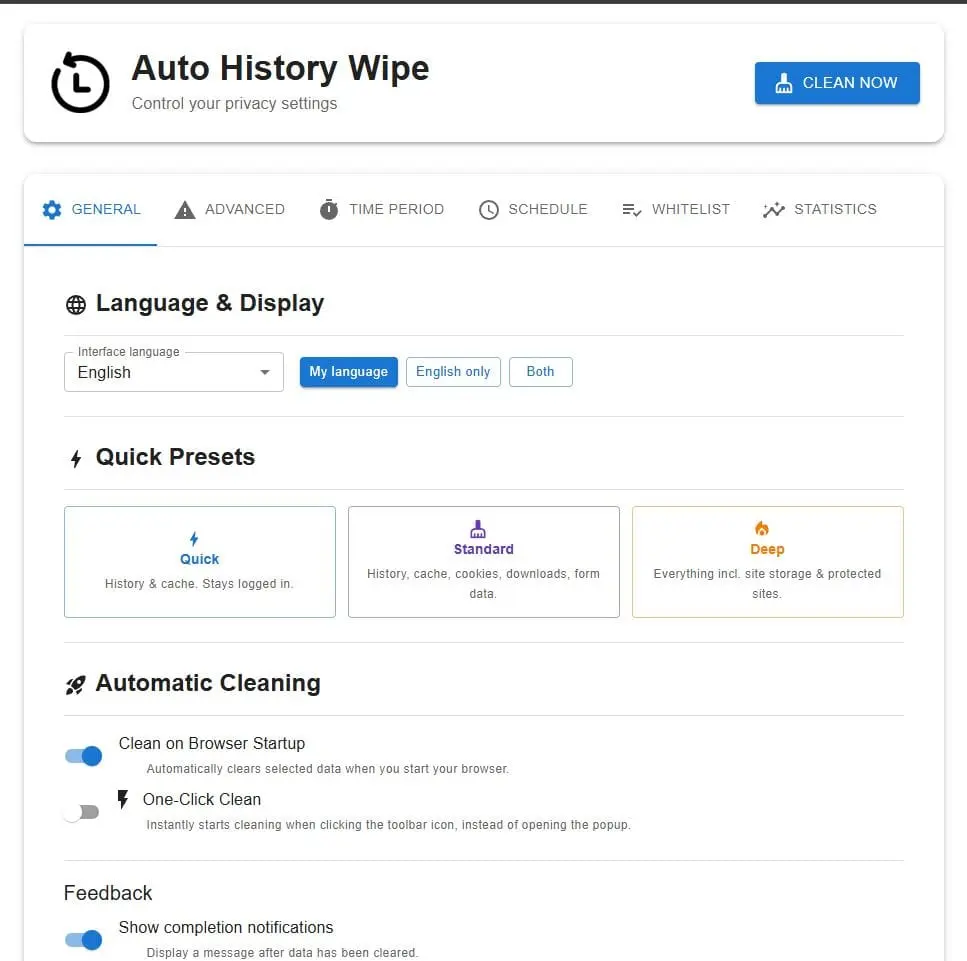
Auto History Wipe is a free browser extension that clears browsing history, cache, cookies, download history and form data automatically — when the browser starts, on a schedule you choose, or with a single click from the toolbar. It is available for Chrome, Edge and Firefox, with an interface in 49 languages. WHAT MAKES IT DIFFERENT Most extensions that clean browsing data ask for permission to read the pages you visit. Auto History Wipe does not, and this is checkable before you install: open the permission list and there is no site access permission in it at all. The extension requests storage, browsingData, alarms, notifications and activeTab — nothing that grants access to page content. Bookmark access is optional, requested only if you turn on bookmark protection, and revocable afterwards. It has no backend. There is no server to contact, no account to create, and no analytics, telemetry or tracking code. Settings and statistics live in chrome.storage.local on your own device. The only network calls the extension makes are reads of its own bundled language files. WHAT IT CLEARS Everyday data, enabled in the Standard preset: - Browsing history - Cache - Cookies and other site data - Download history — the list of what you downloaded. The downloaded files themselves are never deleted. - Form data saved in web forms Advanced data, off by default, each behind its own confirmation dialog: - Saved passwords - Local storage - Service Workers - IndexedDB You choose the list once. Nothing is cleared that you have not selected. WHEN IT RUNS - On browser startup, if you enable that option - On a repeating schedule: hourly, every 12 hours, daily, or weekly. Scheduling is disabled by default until you switch it on. - On demand, from the toolbar button, after a confirmation listing exactly what will be removed - With the keyboard shortcut Ctrl+Shift+E, or Cmd+Shift+E on macOS, from any tab Time range is configurable independently: the last hour, 24 hours, 7 days, 4 weeks, or all time. KEEPING SITES SIGNED IN Cookies, cache and site storage can be preserved for domains you whitelist. A single switch extends that protection to every site you have bookmarked. There is a limit worth knowing before installing: browsing history, download history and form data are always cleared everywhere. Chrome's extension API offers no way to preserve them for individual sites, so no extension can do this — including this one. The whitelist covers what the API allows it to cover, and nothing is claimed beyond that. QUICK PRESETS Three one-click configurations: - Quick — history and cache; you stay signed in everywhere - Standard — adds cookies, download history and form data - Deep — everything, including site storage A separate Deep Clean option reaches sites Chrome shields from ordinary clearing, such as Google and YouTube. It is off by default and named explicitly, because it is the setting most likely to sign you out of services used daily. OTHER DETAILS - Optional local statistics: total cleans, a seven-day activity chart, recent activity. The figures stay on the device and are never transmitted; they can be switched off in settings. - Optional completion notification after each clean. - Confirmation prompts before clearing saved passwords or site storage, so nothing irreversible happens by accident. - Bookmarks are never deleted. Clearing history can temporarily blank the small icons beside bookmarks until the site is visited again — standard browser behaviour affecting every history cleaner. - Search suggestions saved to a Google account live on Google's servers and cannot be removed by any browser extension. Those are managed at myactivity.google.com. WHO IT IS FOR People sharing a computer who would rather the next person did not inherit their browsing history — a family machine, a shared desk, a borrowed laptop. People keeping a work browser separate from personal use. People whose disk fills with cache and who want it emptied on a schedule rather than by hand. The defaults are deliberately conservative and the automation is opt-in, because it is built for someone who configures it once and then stops thinking about it. TECHNICAL Chrome extension Manifest V3. Interface built with React and MUI. The clearing runs through the browser's own browsingData API, scheduling through the alarms API, settings through storage.local, the keyboard shortcut through the commands API, and optional bookmark protection through the bookmarks API. No custom backend, no database, no external service. AVAILABILITY Free, with no account, no paid tier and no feature held behind a subscription. Published on the Chrome Web Store, Microsoft Edge Add-ons and Firefox Add-ons. Around 20,000 users on Chrome at the time of writing, rated 4.6 out of 5. Website: https://autohistorywipe.com/
Screenshots
Reviews (0)
No reviews yet. Be the first to rate this product!
Comments (0)
No comments yet. Be the first to share your thoughts!