
uCreaccion
IA Assistance, Professional Prompt - Content Creation

Details
- Target Audience
- Pricing
- Free
Discovery signals
How AI and people discover uCreaccion on PeerPush
By AI reads among Writing & Documentation tools
2,561 AI reads in the last 30 days, ranked against every Writing & Documentation tool listed.About uCreaccion
# From TPG to uCreacción ## An evolution that better reflects what we are building TPG started with a clear idea: helping people turn their ideas into high-quality instructions for artificial intelligence. But the product has evolved. It is no longer simply about **generating or refining prompts**. The platform now helps users move from an initial idea to a **real, usable result**: documents, content, code, and different AI-generated formats. That is why we needed a name that better represents this new stage. ### TPG becomes uCreacción. --- ## Why uCreacción? The new name puts the focus where the real value of the product lies: ### You create. **uCreacción** combines the idea of **“you”** with **“creation.”** Because AI should not replace your ability to create. It should help you turn the idea in your head into something you can actually use, share, or deliver. **You have the idea. uCreacción helps turn it into reality.** --- ## From Prompt Generator to Creation Platform The name TPG was closely tied to one specific part of the technology: the **Prompt Generator**. It was the right name to explain how the project started. But it limited the way people perceived the product. Today, uCreacción goes much further: **Idea → Understanding → Refinement → Master Prompt → Generation → Result** The prompt is still a fundamental part of the process. But **it is no longer the final product**. It is the mechanism that transforms human intent into something useful. --- ## A brand built for the next stage of AI Artificial intelligence is evolving rapidly. More models, providers, and tools are appearing every day. That is why uCreacción does not want to define itself by a specific model or a single technology. The brand represents a broader idea: > **Making AI-powered creation accessible to everyone, regardless of their technical expertise.** --- ## TPG was the beginning. ### uCreacción is where we are going. The name change represents the evolution of the product: **TPG** Prompt generation. ↓ **uCreacción** AI-assisted creation. We are not abandoning what made TPG different. ### We are expanding it. --- ## A new identity for a bigger vision TPG explained **how** the product worked. uCreacción explains **why** it exists. And that distinction matters. Because our goal is not to teach users how to write better prompts. ### Our goal is to help people create better things with AI. **Welcome to uCreacción.** ### You imagine. ### You decide. ### You create. **uCreacción makes AI work with you.**
Product Video
Watch a video demo of uCreaccion.
Screenshots


Product Updates (12)
Several Mindset Project Changes
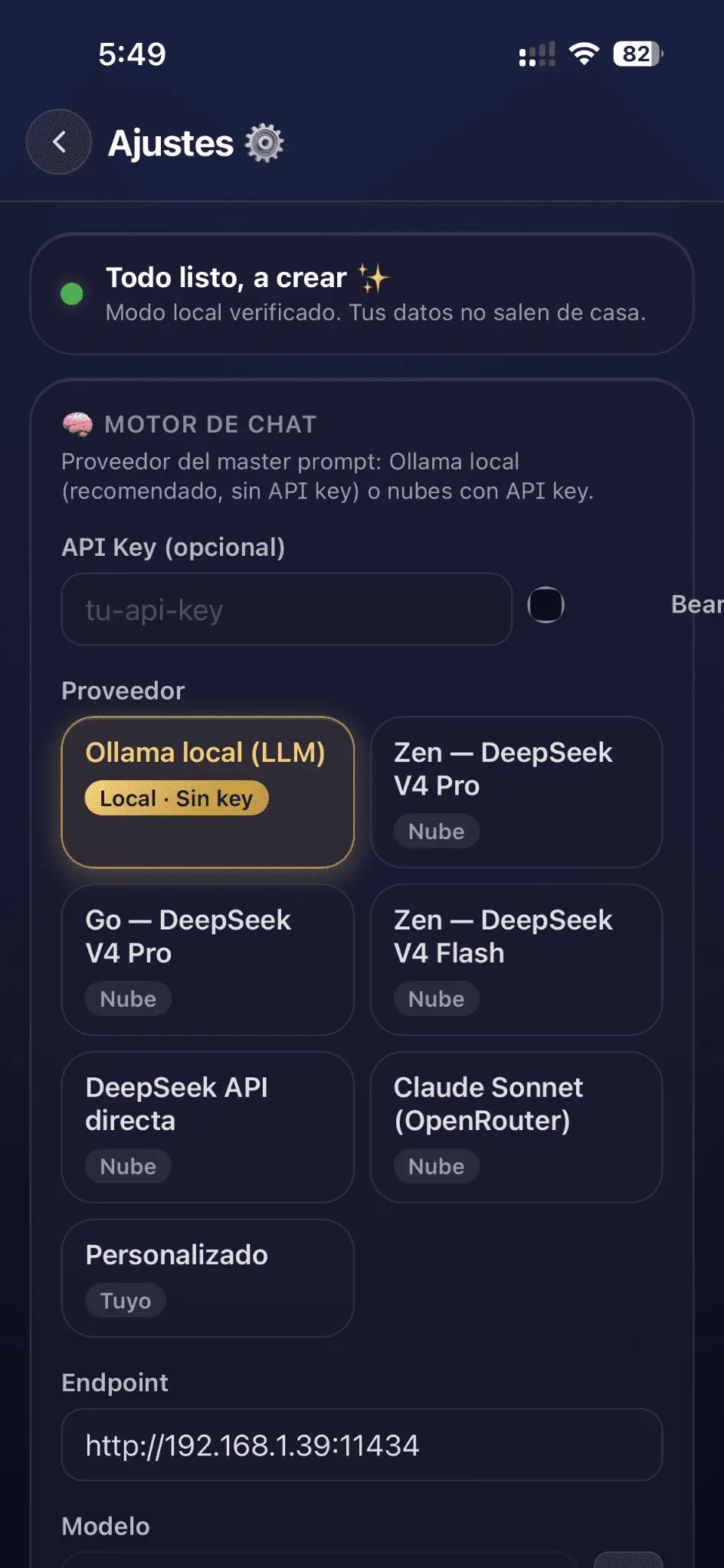
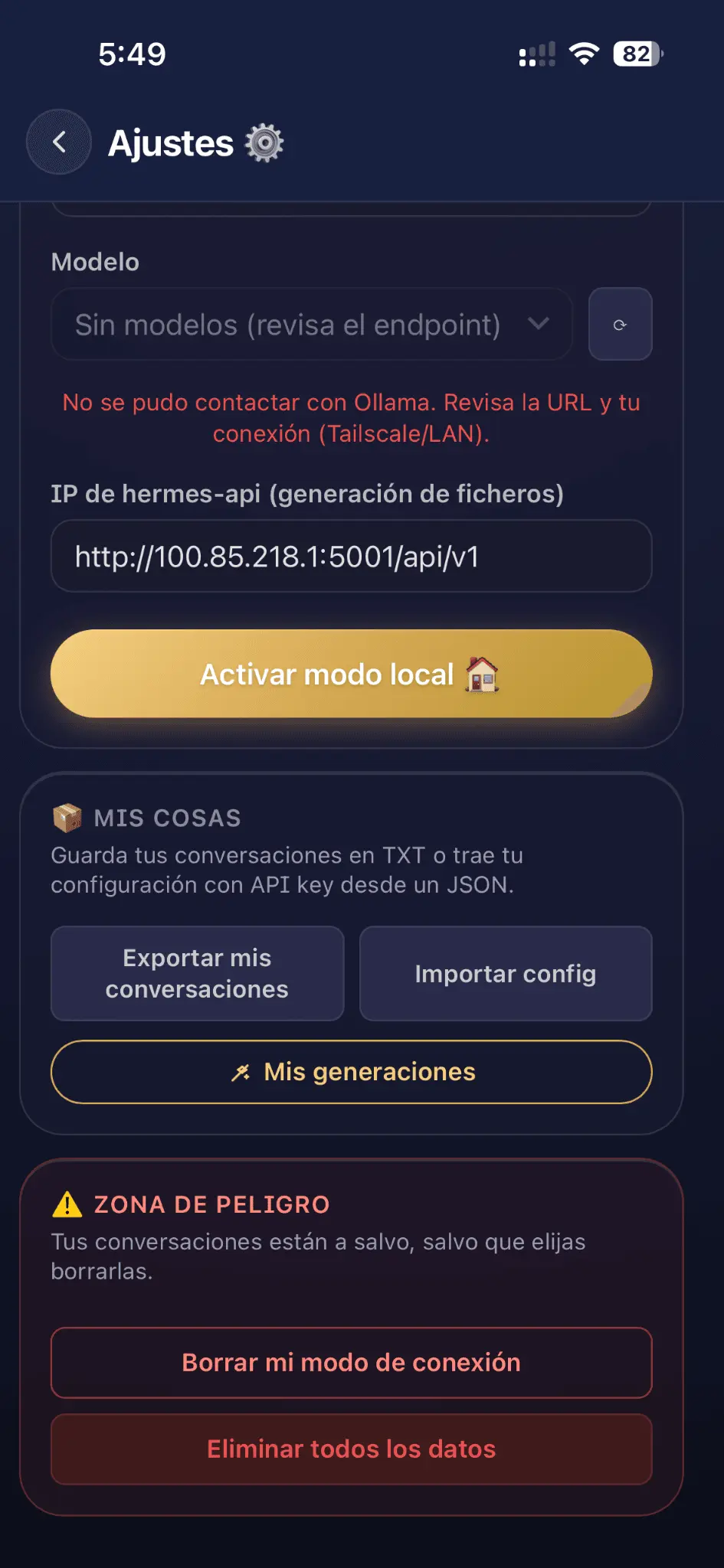
# The Prompter and Go! — Product Overview Open Source product that provides **API-OCHESTADOR** and **API_HERMES** for local network HTTP communication with **CORS enabled** for official Apple clients (iOS, iPad, macOS). ## What changed - **Open Source**: full source available. - **API-OCHESTADOR** and **API_HERMES**: provided APIs for agent-to-agent interaction over the local network. - **CORS**: activated for official Apple clients. - **AI provider or self-hosted ollama**: use your configured provider or run your own. - **Privacy**: no data collected, no tracking. The Apple Store frontend stores all generated data locally. - **Assisted deploy**: `compose.yaml` or `.sh` script. Checks docker; verifies podman or aborts with an error message. One-command deploy. - **File generation**: send the optimized master prompt to your configured provider; request output file (**PDF, DOC, MD, HTML, Plain Text**) from the HERMES agent. - **Prompt master**: optimized and refinable in natural conversation; can be refined as many times as needed. ## Key features - **Instant optimization**: turns any idea into an advanced-engineering prompt in milliseconds. - **Guided refinement**: AI asks questions to build the master prompt. - **API-OCHESTADOR & API_HERMES**: local HTTP APIs with CORS for Apple ecosystem integration. - **Your AI provider or ollama**: full control; zero hidden subscriptions. - **Apple Store interface**: 100% native for iOS, iPad, macOS. All data stays on the device. - **Smart history**: save, reuse, and share best prompts. - **File generation via API_HERMES**: generate PDF, DOC, MD, HTML, or Plain Text through the agent. - **Open Source & Assisted deploy**: `compose.yaml` or `.sh` script. Checks docker; verifies podman or aborts. ## How it works (six steps) 1. **Install the app** from the App Store on iPhone or iPad. 2. **Configure provider or ollama** — set yo
Comments (0)
No comments yet. Be the first to share your thoughts!
Every cloud has a silver lining 🔈🆓
It’s a shame to have a watch but no strap, but it’s an even greater shame to have a strap but no watch. Tauri is special, and I can’t easily test payments on the iOS simulator. Because, yes, we’re actually working on a premium section where you’ll get the most appropriate AI-generated prompts. It’ll be freemium. If you have a key, you don’t pay and you get prompts, but if you decide to go for the best of the best, the results could border on excellence. We’ll keep you posted!
Comments (0)
No comments yet. Be the first to share your thoughts!
Integration for a seamless user experience
The idea of integrating Hermes Agent into the process is being given serious consideration, with a view to enhancing the user experience and ensuring a seamless end result without the need for copy-and-paste between applications. More news to follow
Comments (0)
No comments yet. Be the first to share your thoughts!
GPT has already indexed me
‘What is Prompter and Go! in relation to AI?’ And it seems to refer to my app, but with the tone of a warehouse lad rather than a court scribe of the AIs, ha ha ha! Let’s carry on!
Comments (0)
No comments yet. Be the first to share your thoughts!
Commit -m "Add real example into elegant web"
A real-life example of programming has been featured on the product’s website. It illustrates a use case in the field of programming, but when it comes to content creation or anything to do with information, it offers a truly surprising approach.
Comments (0)
No comments yet. Be the first to share your thoughts!
M A S T E R P R O M P T - 5 --FIN
FORMATO DE SALIDA Primero, muestra un árbol de directorios completo (solo las rutas de archivos, con indentación). Luego, para cada archivo, proporciona su ruta y el contenido completo del código entre bloques de código con la sintaxis de TypeScript. Utiliza el siguiente formato: ``` 📁 src/ ├── 📁 domain/ │ ├── 📁 entities/ │ │ └── user.entity.ts │ ├── 📁 repositories/ │ │ └── user-repository.interface.ts │ └── ... ├── ... ``` Para cada archivo: **`src/domain/entities/user.entity.ts`** ```typescript // contenido ``` Continúa hasta que todos los archivos necesarios queden cubiertos. Asegúrate de incluir también los archivos de configuración en la raíz (`package.json`, `tsconfig.json`, `.env.example`, `prisma/schema.prisma`, etc.). EJEMPLOS - Ejemplo de la entidad `User` en el dominio: exporta una clase con propiedades privadas, un constructor que recibe los valores y validaciones, y getters públicos. - Ejemplo del controlador `auth.controller.ts`: método `login` que llama a `AuthService`, obtiene el token y lo adjunta a la respuesta con `res.cookie('jwt', token, { httpOnly: true, secure: true, sameSite: 'strict' })`. - Ejemplo del guard `jwt-auth.guard.ts`: extiende `AuthGuard('jwt')`, pero en `canActivate` primero extrae el token de `context.switchToHttp().getRequest().cookies?.jwt` y lo añade a `request.headers.authorization` para que Passport pueda leerlo, o personaliza la estrategia para que tome el token directamente de la cookie. - Ejemplo del servicio de aplicación `user.service.ts`: `register` valida si el email ya existe, crea la instancia de `User`, la guarda con el repositorio y retorna el usuario creado (sin password). Al final, incluye una breve explicación de cómo ejecutar el proyecto (asumiendo que se tiene Node.js y una base de datos PostgreSQL) y las principales decisiones arquitectónicas.
Comments (1)


M A S T E R. P R O M P T - 4
7. **Extras** - Incluye un filtro de excepciones global que mapee errores de dominio a HTTP 400/404/409. - Configura el `main.ts` con `app.use(cookieParser())`. RESTRICCIONES Y REGLAS - TypeScript estricto: sin `any` innecesario, todos los tipos explícitos. - Prisma ORM como única base de datos; el esquema debe estar sincronizado con el dominio, pero ningún modelo de Prisma se debe filtrar a la lógica de negocio (siempre mapear entre entidad de dominio y modelo de Prisma). - La autenticación debe usar JWT exclusivamente mediante cookie http‑only (`Set-Cookie` en login, y el guard la lee de `req.cookies`). No usar header `Authorization`. - Las contraseñas se hashean con bcrypt. - Cada archivo debe contener el código mínimo necesario para que la aplicación funcione, pero debe ser completo. - No se deben incluir pruebas unitarias, pero la estructura debe facilitar el testing. - El código debe seguir el principio de inversión de dependencias: las capas internas nunca importan de las externas. - La salida debe ser un único bloque de texto estructurado, no múltiples mensajes separados.
Comments (0)
No comments yet. Be the first to share your thoughts!
M A S T E R P R O M P T - 3
4. **Capa de infraestructura (adaptadores)** - Crea el adaptador `PrismaUserRepository` que implementa `UserRepository` usando `@prisma/client`. Define el modelo `User` en `schema.prisma` con los mismos campos del dominio. Configura `PrismaService` como un provider de NestJS con `onModuleInit`. - Implementa `JwtTokenProvider` que use `@nestjs/jwt` y firme/verifique tokens. - Implementa `AuthServiceImpl` que use `UserRepository`, `TokenProvider` y `bcrypt` para `login`. - Crea un guard `JwtAuthGuard` (extendiendo `AuthGuard('jwt')`) que extraiga el JWT de la cookie (utilizando `cookie-parser`). - Crea una estrategia `JwtStrategy` para Passport que lea la cookie y valide el token. - Crea un interceptor o middleware para manejar la cookie http‑only en la respuesta de login. 5. **Capa de interfaces (controladores HTTP)** - Implementa `UserController` con endpoints RESTful: `POST /auth/register`, `POST /auth/login`, `POST /auth/logout`, `GET /users/:id`, `PATCH /users/:id`, `DELETE /users/:id`. - Aplica validación con `class-validator` en DTOs (`RegisterDto`, `LoginDto`, `UpdateUserDto`). - El controlador solo llama a los servicios de aplicación, sin contener lógica de negocio. - Protege las rutas de usuarios con `@UseGuards(JwtAuthGuard)`. - En `login`, el controlador debe establecer la cookie http‑only con el JWT en la respuesta. 6. **Módulo de NestJS y configuración** - Crea `DomainModule`, `ApplicationModule`, `InfrastructureModule`, `UserInterfaceModule`. - El `AppModule` importa los módulos anteriores y configura `PrismaService` como global, `JwtModule` de forma asíncrona con las variables de entorno, y `CookieParserMiddleware`. - Asegura que la inyección de dependencias respe te los puertos (usa tokens de inyección personalizados para `UserRepository` y `TokenProvider`).
Comments (0)
No comments yet. Be the first to share your thoughts!
M A S T E R P R O M P T 2
NSTRUCCIONES PASO A PASO 1. **Inicialización del proyecto** - Crea la estructura base de un proyecto NestJS con las dependencias necesarias: `@nestjs/common`, `@nestjs/core`, `@nestjs/platform-express`, `@nestjs/jwt`, `@nestjs/passport`, `passport`, `passport-jwt`, `@prisma/client`, `prisma`, `cookie-parser`, `class-validator`, `class-transformer`, `bcrypt`, y las tipificaciones correspondientes. - Configura `tsconfig.json` con `strict: true`, `esModuleInterop`, `target: ES2020`, `module: commonjs`. - Incluye un archivo `.env.example` con `DATABASE_URL`, `JWT_SECRET`, `JWT_EXPIRATION`. - Define el script `prisma:generate` y `prisma:migrate` en `package.json`. 2. **Definir el dominio (capa de dominio)** - Crea la entidad `User` (sin dependencias externas) con campos: `id: string`, `email: string`, `password: string`, `role: 'admin' | 'user'`. - Crea el `UserRepository` como un puerto (interfaz) en el dominio, con métodos: `save(user: User): Promise<User>`, `findById(id: string): Promise<User | null>`, `findByEmail(email: string): Promise<User | null>`, `update(user: User): Promise<User>`, `delete(id: string): Promise<void>`. - Crea los value objects necesarios para validación (ej. `Email`, `Password`) que lancen errores de dominio. 3. **Capa de aplicación (servicios de aplicación y puertos de entrada)** - Implementa `UserService` que use `UserRepository` y exponen casos de uso: `register`, `findById`, `update`, `delete`. - Define un puerto `TokenProvider` (interfaz) con `generate(payload: any): Promise<string>` y `verify(token: string): Promise<any>`. - Define un puerto `AuthService` con `login(email: string, password: string): Promise<{ accessToken: string }>` y `validateUser(payload: any): Promise<User>`. - El servicio de aplicación orquestará la lógica de negocio y lanzará excepciones de aplicación.
Comments (0)
No comments yet. Be the first to share your thoughts!
M A S T E R P R O M P T
ROL Y PROPÓSITO Actúa como un arquitecto de software experto en NestJS, TypeScript y arquitectura hexagonal. Tu objetivo es generar el esqueleto completo de un proyecto NestJS que implemente una API REST con lógica de negocio encapsulada en el dominio, utilizando el patrón de puertos y adaptadores. Debes incluir un módulo de usuarios con CRUD completo, autenticación basada en JWT almacenado en cookie http‑only y persistencia con Prisma ORM. Siguiendo estrictamente la especificación que se detalla a continuación, produce toda la estructura de archivos y el código mínimo funcional en cada uno. CONTEXTO El proyecto acaba de iniciarse. Se trata de un backend para una aplicación que expone una API REST. Se desea establecer desde el principio una arquitectura hexagonal que permita aislar el dominio de los detalles de infraestructura (NestJS, Prisma, HTTP). El módulo de usuarios será el primero y servirá de plantilla para el resto. Se debe garantizar que el código sea auto‑contenido y listo para ejecutar con `npm install` y `npx prisma generate` (suponiendo una base de datos configurable mediante variable de entorno). La autenticación utiliza JWT firmado y lo transmite en una cookie segura, http‑only, con protección CSRF contemplada (SameSite). TypeScript debe operar en modo estricto. INSTRUCCIONES PASO A PASO 1. **Inicialización del proyecto** - Crea la estructura base de un proyecto NestJS con las dependencias necesarias: `@nestjs/common`, `@nestjs/core`, `@nestjs/platform-express`, `@nestjs/jwt`, `@nestjs/passport`, `passport`, `passport-jwt`, `@prisma/client`, `prisma`, `cookie-parser`, `class-validator`, `class-transformer`, `bcrypt`, y las tipificaciones correspondientes. - Configura `tsconfig.json` con `strict: true`, `esModuleInterop`, `target: ES2020`, `module: commonjs`. - Incluye un archivo `.env.example` con `DATABASE_URL`, `JWT_SECRET`, `
Comments (0)
No comments yet. Be the first to share your thoughts!
Example - Hexagonal Architecture -
- Un proyecto recien empezado en nest js. Quiero el prompt para aplicar arquitectura hexagonal por default + 1. ¿Cuál es el rol exacto que debe desempeñar quien ejecute el prompt? (ej. arquitecto de software, desarrollador senior, asistente IA especializado en NestJS). 2. ¿Qué tipo de aplicación se está construyendo y qué módulos de negocio principales debe reflejar el diseño inicial? (API REST, GraphQL, workers, etc.). 3. ¿Qué formato de salida espera obtener? (estructura de archivos comentada, código fuente completo de la arquitectura base, tutorial paso a paso). 4. ¿Existen restricciones técnicas innegociables? (TypeScript estricto, ORM concreto, CQRS, pruebas con Jest, configuración de contenedores, etc.). 5. ¿Necesita ejemplos concretos de lógica de negocio implementada (p. ej., un módulo de “usuarios”) o solo la arquitectura hexagonal vacía lista para rellenar? -1) Arquitecto de software 2) Api rest 3) estructura de archivo y contenido mínimo por archivo 4) TS stricto, prismaORM, 5) haz la gestion y crud de usuarios de todo backend con jwt y cookie http only.
Comments (0)
No comments yet. Be the first to share your thoughts!
Skill | Meta Skill
Don’t let anyone try creating a meta-prompt to build a skill… because they’ll love it
Comments (0)
No comments yet. Be the first to share your thoughts!
Reviews (1)
Average 4.0 out of 5
Based on 1 review

Comments (2)
Really cool idea!
@corey ty
Have you tried The Prompter and Go to create the perfect prompt for your code’s agent plan?